
Blog

Maintaining Website resilience when EOFY distracts
EOFY pressure? Build website resilience with WordPress updates, 2FA, offsite backups and a restore test so your site keeps selling.

You’ve probably heard that launching an online store requires thousands of dollars and technical expertise you don’t have. That’s outdated thinking. WooCommerce is a free, open-source e-commerce plugin for WordPress that transforms websites into customisable online stores, making professional e-commerce accessible to Canberra small businesses without breaking the bank. This guide walks you through what WooCommerce actually is, how it works, what it costs, and how to set it up properly for Australian businesses. You’ll discover practical steps, cost breakdowns, and expert insights tailored specifically for small business owners in Canberra, Queanbeyan, and Googong who want to sell online affordably and effectively.
| Point | Details |
|---|---|
| Free core platform | WooCommerce is a free, open-source plugin that transforms WordPress sites into online stores with no monthly subscription fees. |
| Hosting drives costs | While the plugin is free, hosting, extensions, and payment gateways add costs starting around AU$5 to AU$15 monthly for small stores. |
| Full ownership and control | Ideal for small businesses due to customisability, 1000+ extensions, and complete data ownership unlike hosted platforms. |
| Performance matters | Proper setup and quality hosting are crucial for site speed and sales, with optimised stores performing 40% faster on mobile than competitors. |
| Australian configuration essential | Configuring GST, taxes, and shipping correctly is mandatory for compliance and smooth operations in the Australian market. |
WooCommerce is a powerful plugin that adds comprehensive online store features to any WordPress website. It’s completely open-source, meaning you get full access to the code and can customise every aspect of your store to match your business needs. Unlike subscription platforms that lock you into monthly fees and limited control, WooCommerce gives you complete ownership of your data and store functionality.
The plugin handles all essential e-commerce operations seamlessly. You can manage products with unlimited variations, process orders through a sophisticated shopping cart system, accept payments via multiple gateways, and track inventory automatically. The checkout process is secure and customisable, letting you create the exact customer experience you want. For businesses ready to scale, WooCommerce includes a REST API that developers use to integrate your store with other systems, plus CLI tools for advanced management tasks.

Mobile management is built in through the WooCommerce mobile app, letting you check orders, update products, and respond to customers from anywhere. This flexibility matters when you’re running a Canberra business and need to manage your store between client meetings or after hours.
Setting up WooCommerce follows a straightforward process:
The setup wizard guides you through critical decisions like choosing your currency, setting tax rates, and configuring shipping zones. You’ll answer questions about your business type, where you sell, and what payment methods you want to accept. The wizard then automatically configures appropriate settings, saving you hours of manual setup work.
Pro Tip: Start with core WooCommerce features and add extensions only when you identify specific needs. Every additional plugin slows your site slightly, so keeping things lean maintains the fast loading speeds that convert browsers into buyers.
Understanding the true cost structure helps you budget accurately and avoid surprises. Core platform is free with no monthly fees or transaction costs beyond payment gateways, which fundamentally changes the economics compared to Shopify or BigCommerce charging monthly subscriptions regardless of sales volume. You only pay for the infrastructure and optional enhancements you choose.
Your primary ongoing expense is hosting, which determines site performance and reliability. Poor hosting causes slow page loads that cost sales, while quality hosting keeps your store fast and available 24/7. Recommended hosts include SiteGround starting at $4.99 monthly and Cloudways at $14 monthly, both meeting WooCommerce’s technical requirements of PHP 7.4+ and WordPress 6.8+. These prices cover typical small business stores handling moderate traffic and order volumes.
For Canberra businesses, choosing WordPress hosting with Australian servers or CDN integration improves loading speeds for local customers. Faster sites directly increase conversion rates, with studies showing even one second delays reducing conversions by 7%.
| Cost category | Typical range | Notes |
|---|---|---|
| Hosting | AU$5 to AU$15/month | Entry-level shared or managed WordPress hosting suitable for small stores |
| Domain name | AU$15 to AU$30/year | Your store’s web address, renewed annually |
| SSL certificate | Free to AU$100/year | Often included free with hosting, essential for secure checkout |
| Premium theme | AU$50 to AU$100 one-time | Optional, many free themes work well |
| Payment gateway fees | 1.5% to 3% per transaction | Stripe, PayPal, and others charge per sale |
| Extensions | AU$0 to AU$200/year | Only if you need specific features like subscriptions or bookings |
Payment gateways charge transaction fees regardless of platform. Stripe typically charges 1.75% plus 30 cents per Australian transaction, while PayPal runs around 2.6% plus 30 cents. These costs are identical whether you use WooCommerce, Shopify, or any other platform, so they shouldn’t influence your platform decision.
Extensions add functionality beyond core features. Most small stores operate perfectly with free plugins, but you might invest in premium extensions for advanced shipping calculations, subscription products, or booking systems. Popular paid extensions range from AU$79 to AU$199 annually, though many businesses never need them.
Developer costs vary widely based on customisation needs. Simple setup and configuration might cost AU$500 to AU$1,500, while complex custom development runs higher. Many Canberra businesses handle basic setup themselves, then engage developers for specific customisations as needed.
Pro Tip: Invest in managed hosting and ongoing WordPress site support from day one. The AU$20 to AU$50 monthly cost prevents crashes during peak sales periods and keeps your store secure, easily paying for itself by avoiding lost revenue from downtime.
Australian businesses face specific configuration requirements that overseas guides often miss. GST compliance isn’t optional, and incorrect tax settings create accounting headaches and potential regulatory issues. WooCommerce handles Australian taxes well once configured properly, but you need to set it up correctly from the start.
Configuring GST in WooCommerce:
Shipping configuration significantly impacts customer satisfaction and your operational efficiency. Australian businesses typically use Australia Post, CouriersPlease, or Sendle for deliveries. WooCommerce supports multiple shipping methods simultaneously, letting customers choose their preferred option at checkout.
| Shipping method | Pros | Cons |
|---|---|---|
| Flat rate | Simple to set up, easy for customers to understand, predictable costs | Doesn’t account for weight or distance variations, may lose money on heavy or distant orders |
| Free shipping | Increases conversion rates, competitive advantage, encourages larger orders | Reduces margins unless built into pricing, can attract unprofitable customers |
| Weight-based | Fair pricing reflecting actual costs, scales with order size | Requires accurate product weights, more complex setup |
| Zone-based | Charges appropriately for distance, optimises for local vs interstate | Requires defining shipping zones, more initial configuration |
| Real-time carrier rates | Accurate costs from Australia Post or couriers, transparent to customers | Requires paid extension, depends on carrier API availability |
Performance optimisation prevents the slow loading speeds that kill conversions. For Australian businesses, configure GST and taxes properly, avoid plugin bloat, use High Performance Order Storage, enable caching, and test checkouts thoroughly. Each of these practices directly impacts whether visitors become customers.
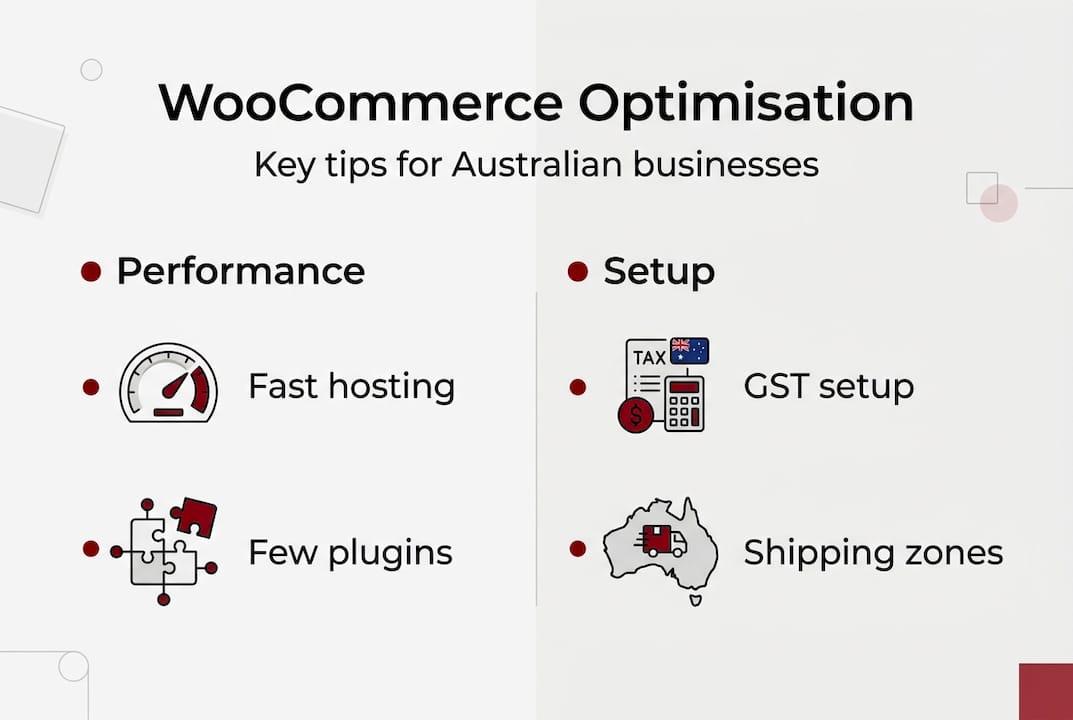
HPOS is WooCommerce’s modern order storage system that dramatically improves performance for stores processing significant order volumes. Enable it through WooCommerce Settings under Advanced. Caching plugins like WP Rocket or W3 Total Cache store pre-generated page versions, reducing server load and speeding up page delivery to customers.
Plugin bloat is the silent killer of WooCommerce performance. Every installed plugin adds code that runs on every page load. Audit your plugins monthly and remove anything you’re not actively using. A lean site with 15 essential plugins outperforms a bloated site with 40 plugins, even if the bloated site has better hosting.
Checkout testing catches issues before they cost sales. Create test orders weekly using different payment methods, shipping options, and product combinations. Verify that confirmation emails arrive promptly, order data appears correctly in your dashboard, and payment processing completes smoothly. Many businesses lose sales to checkout errors they never knew existed because they assumed everything worked.
Pro Tip: Update WooCommerce, WordPress, and all plugins monthly during low-traffic periods. Updates patch security vulnerabilities and fix bugs, but occasionally cause conflicts. Updating regularly with small incremental changes is far safer than updating once yearly with massive version jumps that break your site.
WooCommerce’s flexibility and cost structure make it ideal for small businesses seeking full data ownership and customisation through 1000+ extensions that adapt to virtually any business model. Unlike hosted platforms where you’re locked into their feature set and pricing, WooCommerce grows with your business without forcing platform migrations that disrupt operations.
Real businesses achieve remarkable results with properly configured WooCommerce stores. Dan-O’s Seasoning scaled to processing 4,000 monthly orders through their WooCommerce store, while House of Malt increased average order value by 22% using product bundles and upsells. These weren’t massive enterprises with unlimited budgets. They were small businesses that invested in proper setup and optimisation.
Performance advantages compound over time. Optimised WooCommerce stores beat Shopify speed by 40% faster on mobile in documented cases, while poor setup loses sales to crashes and slow loading. Mobile performance particularly matters since over 60% of e-commerce traffic now comes from smartphones and tablets. Every second of delay costs conversions.
Optimised WooCommerce stores beat Shopify speed by 40% faster on mobile in documented cases, while poor setup loses sales to crashes and slow loading.
Key benefits for Canberra small businesses:
Common pitfalls sabotage otherwise solid stores. Installing too many plugins creates conflicts and slows page loads. Choosing cheap hosting saves AU$5 monthly but costs hundreds in lost sales from downtime and slow speeds. Neglecting updates leaves security vulnerabilities that hackers exploit. Skipping mobile testing misses issues affecting the majority of customers.
The difference between struggling and thriving WooCommerce stores usually comes down to three factors: quality hosting, lean plugin selection, and regular maintenance. Businesses treating their online store as critical infrastructure that deserves proper investment consistently outperform those cutting corners to save a few dollars monthly.
Canberra’s business community benefits from local WordPress developers who understand regional needs. Working with custom WordPress development experts familiar with Australian tax requirements, shipping logistics, and local payment preferences accelerates your success and avoids costly mistakes.
Pro Tip: Engage with local WordPress and WooCommerce developers for tailored solutions and ongoing optimisation. Their familiarity with Canberra business conditions and Australian compliance requirements saves time and prevents expensive errors that generic overseas developers often make.
Building a successful online store requires more than installing WooCommerce and adding products. You need proper configuration, security hardening, performance optimisation, and ongoing maintenance to keep your store running smoothly. Asporea Digital offers tailored WordPress and WooCommerce development specifically for Canberra small businesses, understanding the unique challenges you face in the local market.
Our custom WordPress development process ensures your store launches with proper foundations, from GST configuration to mobile optimisation. We provide affordable custom plugin development that enhances your store’s features without the ongoing subscription costs of premium extensions.

Security matters critically for e-commerce sites handling customer payment information. Our proven practices cut security breaches by 60% for small businesses, protecting your reputation and customer data. Partner with experts who understand local business needs and ensure your online store thrives in Canberra’s competitive market.
Yes, WooCommerce is designed for users of all skill levels with a setup wizard that guides you through initial configuration step by step. The dashboard uses clear language and intuitive controls that most business owners master quickly. Expert support is available through the WooCommerce community forums, documentation, and local developers if you need help with customisation or troubleshooting specific issues.
The WooCommerce plugin itself remains free forever with no subscription or transaction fees from WooCommerce. You’ll pay for monthly hosting starting around AU$5 to AU$15, optional paid extensions if you need advanced features, and payment gateway fees of 1.5% to 3% per transaction. Total costs vary widely depending on your store size, traffic volume, and required features, but many small businesses operate successfully on AU$20 to AU$50 monthly.
WooCommerce supports comprehensive GST configuration through built-in tax settings that comply with Australian regulations. Navigate to WooCommerce Settings, enable tax calculations, set your GST rate to 10%, and configure whether prices display inclusive or exclusive of tax. Set your business address as the tax origin point and test checkout thoroughly to ensure accurate tax calculations. For complex scenarios involving business website tax setup in Canberra, consult with local developers familiar with Australian requirements.
WooCommerce is fully mobile-friendly and optimised stores outperform competitors by 40% faster on mobile when configured correctly. Ensure you choose quality hosting, enable caching, optimise images, and use a responsive theme to deliver fast loading speeds. Poor setup with cheap hosting and excessive plugins creates slowdowns that cost mobile sales, so proper optimisation is essential for capturing the 60%+ of traffic coming from smartphones and tablets.

EOFY pressure? Build website resilience with WordPress updates, 2FA, offsite backups and a restore test so your site keeps selling.

A writer’s website builds credibility before the book deal. Build your writer website to intentionally to grow with your audience.

Stop scrambling when something breaks. Know who owns domain, DNS, hosting, email and payments, and keep access and support details in one place.
