

Blog

The Practical Fixes That Stop Spam Getting Through
Reduce contact form spam without annoying real customers. Add simple form protections, improve email delivery, and use hosting filters to quarantine junk.

System downtime gets longer when it people can’t answer basic setup questions: who owns the account, which email address it’s registered under, where the login is, and who to contact. This check fixes that. It’s not technical. It’s organisational.
Your website name is your domain, like yourbusiness.com.au. The business should own it, not a former staff member, not a contractor, not an old agency.
Open a note and record where the domain is registered, which email address is used for the account, and who in your business can log in. If you cannot log in right now without guessing, treat that as a problem to fix. Move ownership to a business controlled email address and make sure at least two trusted people can access it.
There’s a dashboard behind the scenes that tells the internet where to send people when they visit your website, and where to send messages when someone emails you. That dashboard is DNS. You don’t need to understand DNS settings to do this check. You only need to know who controls that dashboard.
Write down where the DNS dashboard lives, which email address owns the account, and who can log in. If DNS is managed by a provider you no longer deal with, or it’s tied to an email address nobody monitors, bring it back under your control. This is one of the most common reasons businesses get stuck during an outage.
Hosting is the service that runs your website. When the website is down, slow, or showing errors, you often need hosting support quickly, even if someone else maintains your site day to day.
Record the hosting provider, the account email used for the hosting account, and who can log in. Then do one simple test: can you find the support contact or support portal link in under a minute? If you can’t, you’ll waste time when it matters.
You don’t need technical detail here either. You need ownership and access.
Write down which provider runs your email (Google, Microsoft, or another), which account holds admin access, and who can access any shared inboxes, especially those used for invoices, bookings, enquiries, or client documents. Shared inboxes are where access quietly spreads over time. If you can’t name who has access, you can’t control it. Fix that.
If you take payments online, you have a payment provider account. Problems tend to arrive as a login challenge, a verification request, a payout delay, or a chargeback. None of those are the moment you want to discover that the login is tied to an old email address or only one person has access.
Record which provider you use, which email address owns the account, and who can log in. Make sure access is held by the business, not a person who might be unavailable.
If logins are stored in a spreadsheet, in someone’s inbox, or in a notebook, the business is relying on memory and luck. Store credentials in a business owned password manager so access can be shared properly and removed cleanly when someone leaves. This is the simplest way to stop “only one person knows” becoming a recurring problem.
Keep this practical. One page.
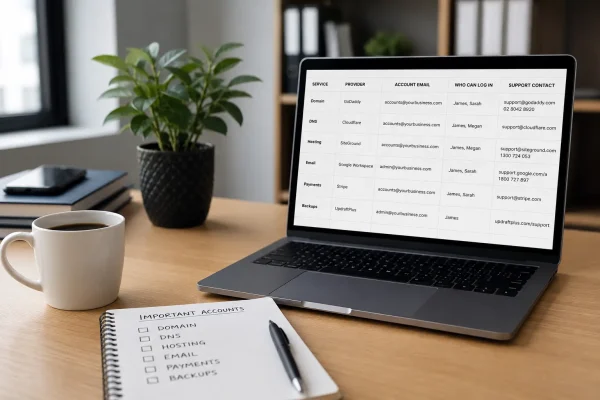
List your domain provider, DNS dashboard, hosting provider, email provider, and payment provider. For each one, include the account email, who can log in, and how to contact support. Add one line on where backups are and who is responsible for restores. The goal is to remove searching and guessing.
Cards expire, renewal notices go to the wrong inbox, and access lists drift. A short recheck every few months keeps ownership clean and access current. The work stays small if you don’t let it slide for years.

Reduce contact form spam without annoying real customers. Add simple form protections, improve email delivery, and use hosting filters to quarantine junk.

Many Canberra businesses think they own their domain name when they don’t. Learn how to protect your brand and keep control of your website with

Web writing is about creating comfort for your visitor. When people feel comfortable and understand what you do, that’s when they choose you.
