

Blog

Google Analytics: The So What Guide to Website Metrics
Turn Google Analytics website metrics into action: what to fix when visits drop, actions stall, or the wrong page becomes your front door.

TL;DR:
- Website integration connects your website to other software systems, enabling automated data exchange and functionality. It transforms a static site into an active platform that handles bookings, customer records, and payments with minimal manual effort. Proper security measures, including authentication protocols like HMAC, JWT, or OAuth, are essential to protect these connections from potential threats.
If you have ever wondered why some websites feel alive while others sit there doing nothing, the answer is often website integration. At its core, website integration means connecting your website to other software systems so they can share data and work together. It is not simply about adding a plugin or embedding a form. Done properly, it turns a basic online presence into a connected platform that handles bookings, syncs customer records, processes payments, and triggers follow-up emails without anyone lifting a finger. This guide covers the meaning, types, security considerations, and practical steps you need to know.
| Point | Details |
|---|---|
| Integration is more than plugins | Website integration connects systems for real data exchange, not just surface-level feature additions. |
| APIs are the core mechanism | Most modern integrations rely on APIs to transfer data between your website and other tools. |
| Security cannot be an afterthought | Authenticating and validating data connections protects your business and your customers from real harm. |
| Scaling needs a plan | Point-to-point connections become unmanageable fast. Middleware platforms help you stay in control. |
| Start with business goals | Choose integrations that solve a specific problem, then build outward from there. |
Website integration is commonly defined as connecting a website to other apps or software so data can transfer between them and additional functionality can be added. That definition sounds simple, but the reality is more layered than most people expect.
Think of your website as a hub. On its own, it displays information. Once you integrate it with other systems, it starts to do things. It can pull live inventory from your warehouse, push a new contact into your CRM the moment someone submits a form, or fire an SMS confirmation when a booking is made. That shift from passive display to active participation is what website integration makes possible.
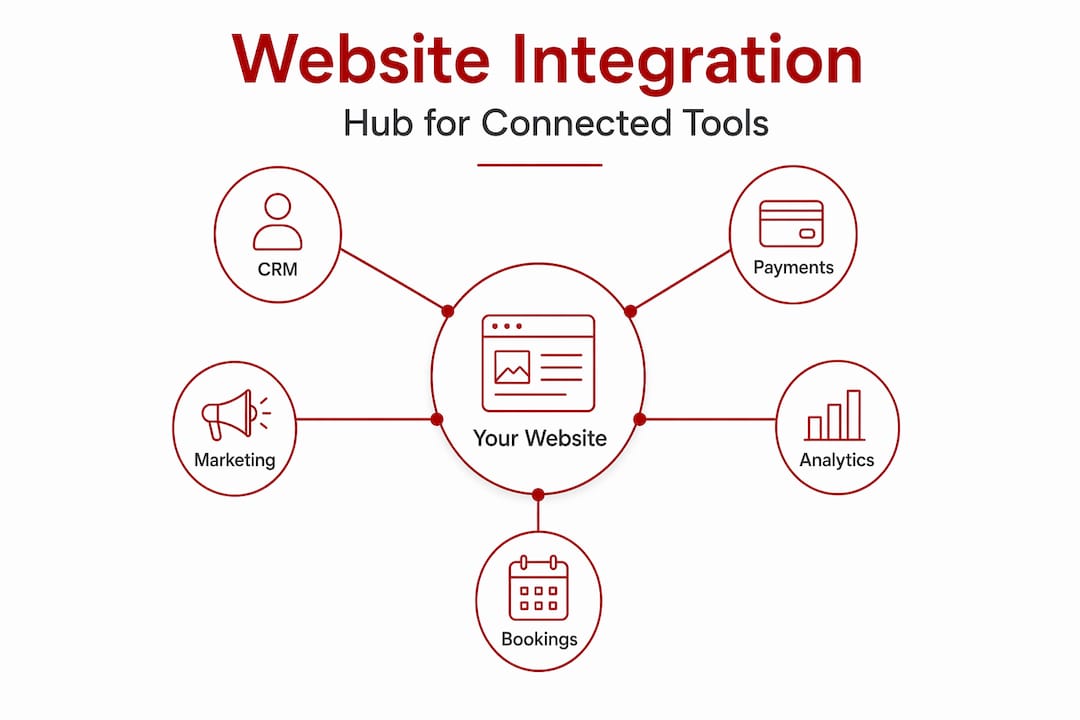
The most common technical method is an API, which stands for Application Programming Interface. API integration connects applications and systems to exchange data through defined flows, using web protocols like HTTP to expose endpoints that other systems can reach. You do not need to understand the code behind it. What matters is that an API is the agreed-upon channel through which two systems talk to each other, with defined rules about what data gets sent and in what format.
Two other terms worth knowing are webhooks and middleware. A webhook is a push notification from one system to another. Instead of your website asking an external service “has anything changed?” every few minutes, the external service sends a message to your site the moment something happens. This is faster and more efficient.
Middleware, sometimes called iPaaS (Integration Platform as a Service), sits in the middle of multiple systems and manages how they communicate. Rather than building a direct connection between every pair of tools, middleware acts as a central coordinator.
Pro Tip: When you hear “integration,” ask whether it works in real time or on a schedule. Real-time integrations via webhooks are better for customer-facing processes like order confirmations, while scheduled syncs can work fine for reporting and analytics.
Key business workflows commonly served by integrations include ecommerce data sync, marketing automation, analytics, chatbots, CRM connections, and payment gateways. Each category serves a different purpose, and knowing which you need helps you prioritise where to start.
| Integration type | Typical use case | Business outcome |
|---|---|---|
| Ecommerce sync | Connecting your online store with inventory or fulfilment tools | Reduces overselling, automates dispatch |
| CRM integration | Syncing contact forms or bookings with a CRM like HubSpot or Zoho | Keeps customer records current without manual data entry |
| Payment gateways | Linking Stripe, PayPal, or Square to your website | Allows secure transactions directly on the site |
| Marketing automation | Connecting your site to email platforms like Mailchimp | Triggers welcome sequences, follow-ups, and segmented campaigns |
| Analytics tools | Embedding Google Analytics or similar tracking | Reveals user behaviour to guide content and design decisions |
| Chatbots and live chat | Adding AI-powered or live support tools | Handles common queries instantly, captures leads outside business hours |
The role of integrations in websites goes beyond convenience. Each connection you build removes a manual step from your workflow. A Canberra allied health practice, for example, might connect its booking form to a patient management system. Every new appointment creates a record automatically, sends a confirmation email, and adds the patient to a follow-up sequence. Nobody needs to copy data between systems.
If you are looking at website automations to reduce admin and improve how your business operates day to day, integrations are the foundation those automations are built on.
Security is where many businesses either skip steps or underestimate the risk. When your website is connected to external tools, those connections are potential entry points. A form that triggers a webhook, or an API that accepts customer data, needs to be protected just as carefully as your login page.

Webhook security requires authenticating and validating inbound messages before your system processes them. If you do not verify that a message genuinely came from a trusted source, an attacker could send a fake payload and trigger actions inside your system.
Security standards like JWT, HMAC, or OAuth are the practical tools that protect your integrations from being exploited. Choosing the right one depends on the platform you are integrating with and the sensitivity of the data involved.
The risk of skipping this step is not abstract. A poorly secured webhook could allow a bad actor to manipulate orders, fake form submissions, or access customer records. If you are building integrations that handle personal or payment data, treat security as a design requirement from day one, not something to patch later.
Pro Tip: Before going live with any new integration, check whether the external service provides webhook signature verification. If it does, always implement it. This single step closes one of the most common attack surfaces in connected websites.
For a broader view of website security for small business, it helps to understand how API connections fit into the wider picture of protecting your digital platform.
One integration is manageable. Three is fine. But once you have six or eight systems connected to your website, each with its own connection, things get complicated fast. This is the point where many businesses start to feel the strain.
The problem with point-to-point integrations is that each direct connection between two systems creates a dependency. When one system changes its API, every connection to it needs updating. When one connection fails, it can affect everything downstream. Scaling beyond point-to-point connections requires middleware iPaaS to centralise management and prevent failures from cascading.
iPaaS platforms like Zapier, Make (formerly Integromat), or enterprise-grade tools manage the flow of data between systems through a central dashboard. Rather than every system talking directly to every other system, they all talk to the middleware layer. This makes it much easier to monitor, troubleshoot, and update integrations without breaking everything else.
A useful mental model here is to treat each integration as a data contract. Before you build, define what data fields are being exchanged, which system is the source of truth, what happens if the connection fails, and how errors get reported and resolved. Businesses that document integrations this way tend to avoid the silent failures that cost hours to diagnose.
Practical habits that help you stay on top of multiple integrations:
If you are new to integration or reviewing what your current site does, a clear and methodical approach saves time and avoids costly mistakes.
Web service integration through defined API flows is now accessible to businesses of every size. The barrier is no longer technical capability. It is knowing what to connect, in what order, and why.
I have worked with enough small business websites to know that integration is the most underestimated part of digital strategy. Most business owners focus on design, then worry about SEO. Integration often gets treated as an optional extra.
What I have seen in practice is that the businesses getting the most value from their websites are almost always the ones with smart connections running in the background. The physio practice whose booking system pushes directly into their admin software. The tradesperson whose quote request form drops straight into a CRM with a follow-up task assigned automatically. The retailer whose WooCommerce store syncs inventory in real time so customers never see a product that is out of stock.
None of that is technically complex. But it requires someone to think about it deliberately and build it properly. The technology systems approach that treats integrations as architecture rather than afterthoughts is what separates websites that support business growth from ones that just sit there.
The pitfall I see most often is building point-to-point connections without a plan, then scrambling when one breaks. Small, steady habits around documentation and monitoring create a much stronger position over time. If you are planning any digital upgrade in 2026, put integration on the list early.
— James
If this guide has raised questions about your own website and the connections it could be making, Asporeadigital works with Canberra small businesses to design and build WordPress websites with the right integrations built in from the start.

Whether you need a WordPress marketing platform that connects your site to your marketing tools, a smart web design approach that drives real sales results, or a fully integrated ecommerce setup for your online store, the team at Asporeadigital can scope and build it with fixed pricing and direct local support. Get in touch to talk through what your website should be doing that it currently is not.
Website integration means connecting your website to other software tools so they can share data and work together automatically. It turns a static site into a connected platform that handles tasks without manual effort.
The most common types include CRM connections, payment gateways, email marketing platforms, analytics tools, booking systems, and ecommerce inventory sync. Each type removes a manual step and improves how your business operates.
Integration removes the need to copy data between systems, speeds up responses to enquiries, and gives customers a better experience. For small businesses, this directly reduces admin time and improves the chance of converting website visitors into paying customers.
A web service integration uses APIs over the internet to connect two systems so they can exchange data. It is the technical method behind most modern website integrations, allowing platforms to communicate regardless of where they are hosted.
Use authentication standards such as HMAC signatures, JWT, or OAuth to verify that data coming into your system is from a trusted source. Always implement webhook signature verification when the sending platform supports it.

Turn Google Analytics website metrics into action: what to fix when visits drop, actions stall, or the wrong page becomes your front door.

Serialisation can help authors prove reader interest to publishers before a novel is published by releasing serialised chapters through WordPress and PDQ, with a simple

Startup advice from other startups can sound useful, but experience is what helps shape a clearer, stronger business early.
