

Blog

Simple Steps to Protect Your Logins With 2FA
Protect your business accounts with two-factor authentication. Learn how to add 2FA to your email, website, hosting, and WordPress logins.

TL;DR:
- Ongoing website support is essential for Canberra small businesses to prevent security risks, performance issues, and ranking drops. Proper support involves maintenance, SEO, security, and customization, with regular audits and specific local considerations. Partnering with local experts ensures your site remains credible, reliable, and competitive in the Canberra market.
Your website is quietly working for you around the clock, or it is quietly losing you business. For Canberra small business owners, the gap between those two outcomes often comes down to whether ongoing website support is in place. Neglected sites fall victim to security vulnerabilities, plugin conflicts, and slow load times that push potential customers straight to a competitor. This guide walks you through every stage of effective website support, from understanding what it involves to setting up the right routine, verifying results, and knowing when to bring in professional help.
| Point | Details |
|---|---|
| Prioritise regular maintenance | Monthly updates and checks prevent costly downtime or security breaches. |
| Benchmark your website metrics | Aim for 30-50% organic traffic share, page load under three seconds, and low bounce rates. |
| Tailor support to Canberra needs | Adapt strategies for Canberra-specific SEO and compliance to boost local visibility. |
| Invest in security and SEO | Ongoing support pays off with improved customer trust and better search rankings. |
| Treat website support as a growth investment | Long-term commitment delivers measurable business gains beyond just upkeep. |
Running a small business in Canberra is competitive. Whether you are in allied health, trades, consulting, or retail, your website is often the first impression a potential client gets. A site that loads slowly, looks broken on mobile, or has been flagged by Google as insecure will cost you enquiries before you even know they existed.
The risks of neglect are specific and measurable. WordPress site failure statistics show that outdated plugins and themes are among the leading causes of site compromises. Once a site is hacked or blacklisted, recovering both the technical integrity and the trust of your audience takes significant time and money.
Here is what ongoing website support protects you from:
Canberra businesses also face some locally specific pressures. Government procurement standards, ACT-specific compliance requirements, and a well-informed professional client base mean your site needs to look credible and perform reliably. The investment in website support pays off not just in technical stability but in the perception your business creates online.
“Consistent SEO maintenance prevents ranking drops after algorithm updates, keeping your organic visibility steady over time.”
Partnering with the right professional web hosting provider is also part of this equation. Hosting that includes uptime monitoring, managed backups, and server-level security removes a significant layer of risk before you even get to the application level.
Ongoing website support is not a single task. It is a collection of interconnected routines that keep your site secure, visible, and useful for the people visiting it. Understanding each component helps you prioritise where to focus and what to delegate.
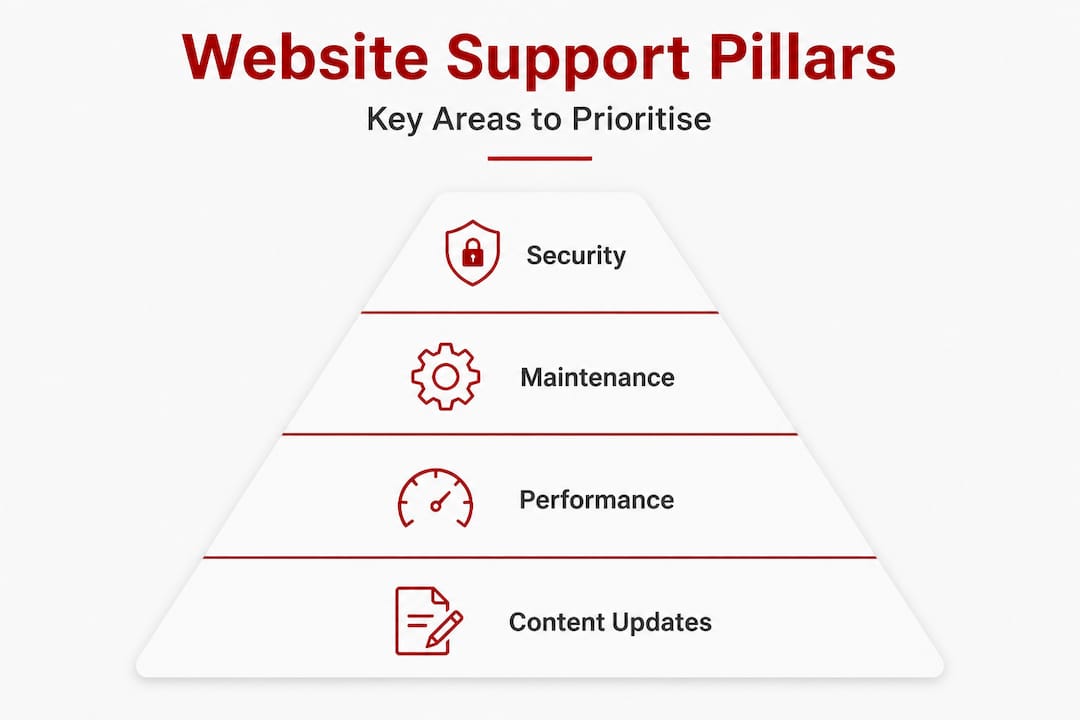
| Component | What it covers | Why it matters |
|---|---|---|
| Maintenance | WordPress core, plugins, themes | Prevents conflicts, downtime, and security gaps |
| SEO | Keywords, content, technical audits | Maintains and grows organic visibility |
| Security | Scans, firewalls, login protection | Protects customer data and site reputation |
| Customisation | Features, integrations, UX improvements | Keeps the site aligned with business needs |
Each pillar relies on the others. A site with excellent security but poor SEO still fails to bring in new clients. A beautifully customised site with no maintenance routine is a liability waiting to surface.
Performance benchmarks give you a concrete way to measure health. According to SEO benchmarking standards, a well-supported site should load in under two to three seconds, maintain a bounce rate below fifty percent, and pass Core Web Vitals assessments. These are not just technical targets. They directly influence where your site appears in search results and how long visitors stay on it.
Good website design practices work alongside maintenance to improve both user experience and search performance. When your site looks professional and loads quickly, visitors are more likely to make contact.
Security deserves special attention. Small business sites are targeted precisely because they often lack the protections that larger organisations take for granted. Our website security guide outlines the practical steps every business owner should take, including two-factor authentication, regular malware scans, and SSL certificate management.
Regular content and feature updates also build trust with both visitors and search engines. A site that has not been touched in eighteen months signals stagnation. Small, steady updates send the opposite message.
Pro Tip: When evaluating maintenance plan strategies, look for providers who include detailed reporting so you can see exactly what has been done each month. Transparency matters.
Before you set up any maintenance routine, it is worth auditing what you already have. Jumping into ongoing support without a clear baseline is like starting a fitness programme without knowing your current health. You need a starting point.
Work through this checklist before you begin:
Aiming for steady organic traffic growth, a thirty to fifty percent organic traffic share, and passing Core Web Vitals scores gives you clear targets to work toward from day one.
Efficient WordPress update management is one of the areas where professional support saves the most time. Updates need to be tested in a staging environment before going live, especially when you have custom code or complex plugin interactions.

Building customer trust through security also starts at this preparation stage. Visitors notice things like SSL padlocks, professional design, and fast load times. Getting these right before you launch into ongoing support means you are starting from a strong position.
With your baseline in place, you can follow a structured routine that keeps your site performing reliably over time. The cadence varies by task, but the logic is simple: the more critical the system, the more frequently it needs attention.
Tracking benchmark metrics for organic traffic, page load speed, bounce rate, and ranking stability gives you a way to prove the value of your maintenance efforts over time. These numbers tell a story, and that story should be one of steady improvement.
Pro Tip: Use a shared Google Sheet or project management tool to log every task completed on your site. This creates an audit trail and makes it far easier to diagnose problems when they arise later.
Maintenance without measurement is guesswork. To know whether your website support is working, you need to track the right indicators and review them consistently.
Regular tracking of organic traffic, Core Web Vitals, and bounce rates is what confirms your support efforts are actually delivering results. Without this data, it is impossible to know whether your investment is justified.
| What to track | Target benchmark | Action if missed |
|---|---|---|
| Page load time | Under 2 to 3 seconds | Optimise images, caching, and hosting |
| Bounce rate | Below 50 percent | Review content relevance and page experience |
| Core Web Vitals | Passing | Address specific failing metric |
| Organic traffic | Month-on-month growth | Review SEO strategy and content |
| Uptime | 99.9 percent or higher | Escalate to hosting provider |
When you spot a problem, work systematically. A sudden drop in organic traffic often points to a Google update, a crawl error, or removed content. A spike in bounce rate usually means something has broken in the user experience. Slow load times are commonly caused by unoptimised images, bloated plugins, or overloaded hosting.
Knowing when to seek professional help is just as important as knowing what to look for yourself. If you are seeing unexplained ranking drops, repeated security incidents, or performance issues you cannot resolve, those are clear signals that it is time to bring in someone with the right technical knowledge.
Most website maintenance guides are written for a generic audience. They cover the basics well enough, but they miss something important for Canberra businesses: context matters enormously.
The Canberra market is not Sydney or Melbourne. The client base here includes government contractors, professional services firms, allied health providers, and community organisations with specific expectations around credibility, privacy, and responsiveness. A cookie-cutter maintenance plan designed for an e-commerce store in Brisbane will not address the particular needs of a Canberra consultancy whose clients expect a polished, secure, and professionally managed online presence.
We have seen businesses in Canberra lose significant contract opportunities because their website looked neglected or loaded poorly during a client due-diligence review. That is not a technical failure. It is a business failure with a technical cause.
The businesses that get the most from ongoing website support are those that treat it as a long-term investment rather than an occasional cost. They are not looking for the cheapest option. They want a reliable partner who understands their market, communicates clearly, and fixes problems before they become visible to clients.
Local SEO is another area where generic advice falls short. Ranking for “business consultant Canberra” requires a different strategy to ranking for the same service in a larger city. The competitive landscape, search volumes, and local signals all differ. Support that accounts for these nuances delivers meaningfully better results.
Understanding what causes WordPress support failures often comes back to a mismatch between the support model and the actual business context. Small, steady habits and a locally informed approach create a far stronger defence than any one-size-fits-all maintenance package.
If you have worked through this guide and recognised gaps in your current setup, the next step is finding support that fits your business and your market.

Asporea Digital provides ongoing WordPress site support built specifically for Canberra small businesses. Whether you need a full care plan covering maintenance, security, and hosting, or targeted help with SEO and performance, we work with you directly, with fixed pricing and no confusing jargon. Our WordPress digital marketing and growth guide can also help you understand how your site fits into a broader growth strategy. When you are ready to take a clearer look at why ongoing support is worth the investment, we are here to help you make an informed decision. Reach out for a website review or a conversation about what your site actually needs.
Regular core updates, plugin checks, security scans, and SEO audits are essential for reliability and visibility. Consistent SEO maintenance also prevents ranking drops after algorithm updates, keeping your organic traffic stable.
Most sites benefit from monthly technical reviews and quarterly SEO audits to maintain benchmarks and minimise risk. Core Web Vitals and ranking stability require steady, consistent attention rather than occasional large overhauls.
Yes, tailored support improves local search visibility and builds the trust that drives higher conversions in the Canberra market. Achieving a thirty to fifty percent organic traffic share is a key benchmark that well-supported sites can realistically reach.
Unexplained traffic drops, slow load times, and security alerts are clear indicators that your site needs expert attention. A bounce rate above fifty percent or page load over three seconds are practical thresholds that signal something needs to be investigated.
Yes, Canberra SMBs face unique local SEO conditions, compliance considerations, and professional client expectations that require a specifically tailored approach. Regional SEO benchmarks and regulatory factors vary meaningfully, making local expertise genuinely valuable rather than just a marketing claim.

Protect your business accounts with two-factor authentication. Learn how to add 2FA to your email, website, hosting, and WordPress logins.

Substack is easy to launch, but paid publishing needs strategy. Shape the content, offer and member journey before adding a paywall.

Protect your WordPress login with Wordfence 2FA, Google Authenticator and backup codes to reduce the risk of unwanted access.
