

Blog

10 Questions You Need to Ask Before Building a Membership Website
Discover 10 essential questions to ask before building a membership website, from content readiness to value and retention.

TL;DR:
- Effective booking forms go beyond scheduling by capturing qualified data, streamlining admin, and shaping client impressions.
- Designing short, logic-driven, mobile-friendly forms with layered reminders and CRM integration enhances business operations and reduces no-shows.
Most service businesses treat booking forms as a necessary formality. You add one to your website, someone fills it out, and an appointment appears in your calendar. Job done. But that framing sells the tool well short. The role of booking forms in a well-run business goes far beyond scheduling. Done thoughtfully, a booking form captures qualified data, reduces manual admin, preps your team before a client arrives, and shapes the first impression a prospect forms of your professionalism. This article walks through what effective booking forms actually do, how to build them well, and where most businesses quietly go wrong.
| Point | Details |
|---|---|
| Booking forms as data tools | A well-built form captures, qualifies, and routes client information automatically into your systems. |
| Form length shapes completion | Keeping initial forms to 5 to 7 fields protects completion rates and reduces abandonment. |
| Reminders reduce no-shows | Automated, multi-channel reminder sequences can cut no-show rates by 20 to 50 per cent. |
| CRM integration saves admin | Forms connected to your CRM can automate up to 90 per cent of manual data entry. |
| Accessibility carries legal risk | Poorly built booking widgets can create legal exposure through accessibility failures. |
Think of a booking form as a front-of-house team member working around the clock. It greets the client, collects the right details, routes information to the right person, and confirms the appointment without you lifting a finger.
The importance of booking forms becomes clearer when you look at what they replace. Without them, you are fielding phone calls, copying details into spreadsheets, typing confirmation emails manually, and hoping nothing falls through the gaps. That is a fragile system. A properly built booking form removes each of those steps.
Here is what a booking form can do in a modern service operation:
The benefits of booking forms compound over time. Each booking handled automatically is time freed for actual service delivery. Each lead pre-qualified through a form is a meeting where your team walks in informed.
Not all booking forms are equal. A form that converts well and serves your clients is built around a few specific decisions, not just the right software.
1. Keep the first form short. Your initial booking form should focus on securing the appointment, not gathering every detail upfront. Initial booking forms should stay at 5 to 7 fields to maintain momentum. Save the intake questions for a follow-up email or a second form sent after confirmation.

2. Use conditional logic to tailor the experience. Rather than asking every client every question, conditional logic shows or hides fields based on previous answers. This keeps the form feeling relevant rather than exhausting.
3. Design for every device. A significant share of bookings happen on mobile. If your form is awkward to complete on a phone, you are losing clients at the final step. Test on multiple screen sizes before going live, and confirm that tap targets and date pickers work properly.
4. Build a layered reminder sequence. Automated reminders sent at three days, one day, and the day of the appointment across SMS, email, and phone create the best outcomes. 64 per cent of patients prefer SMS; emails carry the detail; phone calls serve as a final escalation for high-value appointments.
5. Integrate payment for upfront deposits. For services with a history of no-shows, collecting a deposit at the time of booking changes behaviour quickly. Most modern booking tools support this through Stripe or similar.
Pro Tip: Test your booking form yourself, on a phone, in under two minutes. If you cannot complete it comfortably in that time, your clients are abandoning it.
The features of effective booking forms are not about adding more. They are about removing friction at every step while capturing what you genuinely need.
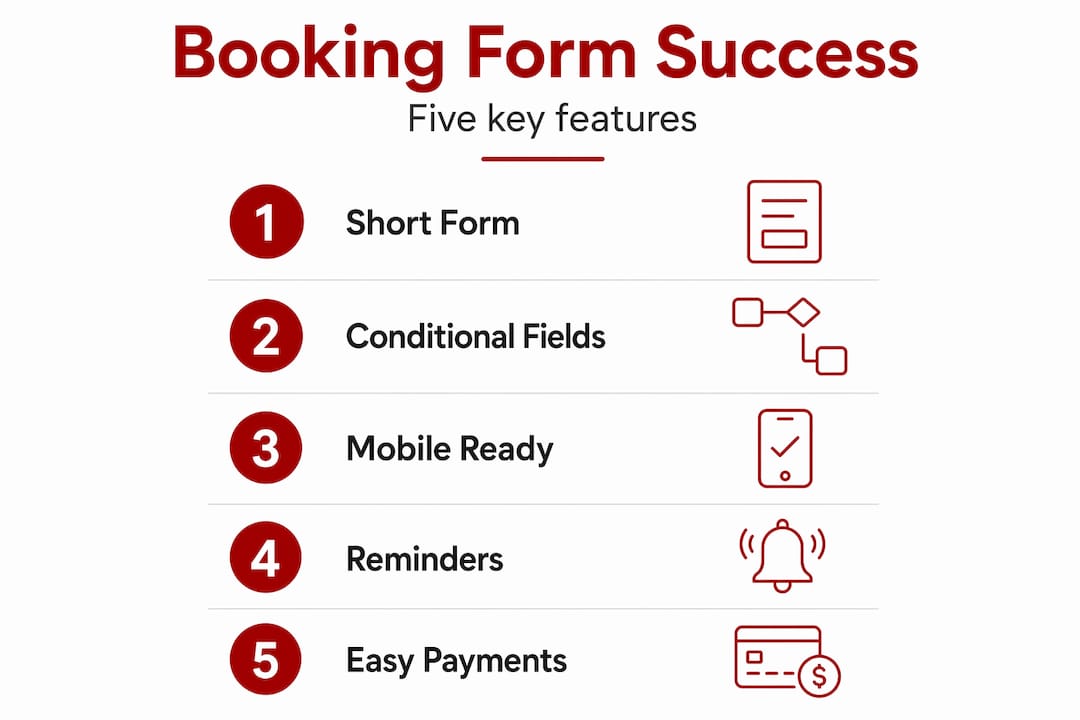
The gap between a booking form that works and one that quietly costs you clients is usually found in a handful of avoidable mistakes.
The most common is overloading the form. Every additional field beyond the minimum reduces completion rates by around 7 to 11 per cent. Businesses that ask for 12 pieces of information upfront rarely get 12 answers. They get an abandoned form.
Here is how the most common pitfalls compare with their fixes:
| Common mistake | Practical fix |
|---|---|
| Too many fields on the first form | Limit to 5 to 7 fields; defer intake details to post-booking |
| No CRM integration or duplicate records | Define email as the unique key; set clear create/update rules |
| Single-channel reminders only | Layer SMS, email, and phone across a multi-day sequence |
| Ignoring mobile usability | Test every form on a phone before publishing |
| Accessibility not tested | Check keyboard navigation and screen reader compatibility |
Poor CRM integration creates its own problems. Without explicit duplicate detection, you end up with fragmented client records, staff working from incomplete data, and a messy contact database that erodes trust in your systems.
Accessibility is worth separate attention. Date picker failures are among the most common accessibility problems on booking sites, and legal action against small businesses for accessibility failures has increased under frameworks like the ADA and equivalent Australian standards. Keyboard navigation and screen reader testing are not optional extras.
Pro Tip: Schedule a quarterly review of your booking form. Check completion rates, abandonment points, and no-show data. Small adjustments based on real numbers outperform any amount of guesswork.
Knowing the theory matters, but the real benefit comes from implementation. Here is how to put what you have learned into practice.
Map your services clearly before touching any form tool. List each service, its duration, and its price. A booking form can only create a clear path for your client if you have clarified it yourself first. Treat this as workflow mapping rather than a design task.
Choose a tool with native calendar and CRM integration. Duct-taped solutions involving manual exports and imports will break at the worst moment. Your booking form should talk directly to your calendar and your contact database without you in the middle.
Set up your reminder sequence before launch, not after. The reminder logic is often configured once and then forgotten. Build it thoughtfully at the start. Multi-channel reminders reduce no-show rates by 20 to 50 per cent, which has a direct impact on revenue for any appointment-based business.
Use multi-step forms for complex services. Rather than presenting 10 fields on a single screen, break the form into logical steps. Step one captures name, contact, and service type. Step two handles the specifics. This approach reduces cognitive load and lifts completion rates.
Track your metrics from day one. Completion rate, abandonment rate, and no-show rate are the three numbers that tell you whether your booking form is actually working. Set up basic tracking before you go live so you have a baseline to measure against.
Review and refine regularly. Booking forms are not set-and-forget. Client behaviour changes, services evolve, and what worked at launch may need adjustment three months later. Build the habit of reviewing form performance on a regular schedule, not only when something breaks.
Knowing how to use booking forms well is not complicated. It is largely about being deliberate. Each step above takes time upfront and saves significantly more time downstream.
I have worked with a lot of service businesses on their websites, and the booking form conversation almost always starts the same way. “We just need something simple.” That instinct is not wrong, but it often leads to a form that is too simple in the wrong places and too complex in others.
What I have found is that the businesses getting the most from their booking forms are the ones treating them as workflows rather than fields on a page. They ask: what does the client need to feel confident about booking? What does my team need to know before the appointment? Where does that information need to live after the form is submitted? Those questions produce a very different form than “what should we ask?”
The other thing I see consistently is underestimating the value of CRM connection. When a booking form feeds directly into your contact database, you stop losing client history. You stop typing the same names into three different systems. And you get a clearer picture of where your enquiries are actually coming from, which is genuinely useful information for a growing business.
The booking workflow design conversation is worth having before you touch any tool. The tool comes second. The thinking comes first.
— James
If you are ready to move from a basic contact form to a booking system that actually works for your business, Asporeadigital builds exactly this for Canberra service businesses. The team designs WordPress websites with integrated booking functionality that connects to your calendar, CRM, and reminder workflows from the start.

Every build is scoped clearly and priced at a fixed rate, so there are no surprises. Whether you run a consulting practice, an allied health clinic, or a trade service, Asporeadigital can configure a booking setup that reduces your admin and improves the experience for your clients. Take a look at how website design shapes business outcomes for Canberra SMBs, or get in touch directly to talk through what your business needs.
Booking forms capture client details, qualify leads, automate confirmations, and feed data into CRM systems. They replace manual admin tasks and improve the consistency of your client experience from first contact.
Keep initial booking forms to 5 to 7 fields. Each additional field reduces completion rates by 7 to 11 per cent, so defer detailed intake questions to post-booking communications.
Automated multi-channel reminders sent via SMS, email, and phone at timed intervals before the appointment can reduce no-show rates by 20 to 50 per cent. The reminder sequence matters as much as the form itself.
An accessible booking form supports keyboard navigation, works with screen readers, and uses date pickers that do not rely solely on mouse interaction. Accessibility failures in booking widgets are among the most common causes of legal complaints for small businesses.
When integrated correctly, a booking form creates or updates a contact record in your CRM automatically based on the email address submitted. Defining how duplicates are detected and handled upfront prevents fragmented data and keeps your client database reliable.

Discover 10 essential questions to ask before building a membership website, from content readiness to value and retention.
Many websites lose leads on the contact page. Uncover the most common mistakes and how to design a page that builds confidence and action.

This auto-refresh plugin adds a neat on or off switch to any page so the page refreshes itself on a safe schedule with a shortcode.
