

Blog

Asporea Digital Academy: Practical Digital Learning for Business Owners
Practical digital learning for business owners. Start with Asporea Digital Academy’s free course on why your website isn’t ranking.

TL;DR:
- Website scalability allows websites to grow with increasing traffic and data without performance loss or complete rebuilds. Building with modular, decoupled architecture, using techniques like caching and database optimization, enables cost-effective and efficient growth. Prioritizing scalability from the start helps prevent costly site failures and supports long-term business expansion.
Website scalability is defined as the capacity of a website to handle increasing traffic, data, and complexity without losing performance or requiring a complete rebuild. For business owners, this is not a technical luxury. It is a strategic foundation. Over 60% of digital initiatives fail to scale due to poor foundational planning, which means most businesses discover the problem only after it has already cost them customers. A scalable website uses tools like Redis, Memcached, and cloud-native infrastructure to stay fast and reliable as your business grows. Getting this right from the start protects your investment and keeps your site working when it matters most.
Website scalability is the ability of a site to grow with your business without breaking down under pressure. The industry term you will encounter in technical conversations is “scalable web architecture,” and it describes the same idea at a structural level. Both terms are worth knowing.

Scalability is fundamentally a business strategy, not just a technical specification. A site that cannot handle a surge in visitors after a media mention, a product launch, or a busy seasonal period will lose sales and damage trust at exactly the wrong moment. That cost is real and measurable.
The importance of website scalability becomes clear when you consider what happens without it. Slow load times, crashed pages, and failed transactions push visitors away. They also signal to Google that your site is unreliable, which can hurt your search rankings over time. Building for growth from the beginning avoids these problems before they appear.
A scalable website is built on a modular, decoupled architecture. This means the frontend (what visitors see), the backend (the logic and data processing), and the database are separated so each can be updated or expanded independently. Think of it like a building with interchangeable rooms rather than load-bearing walls everywhere.
Two core approaches define how websites handle growth:
Vertical scaling increases server power; horizontal scaling adds servers for greater capacity. The distinction matters because choosing the wrong approach early can lock you into expensive infrastructure decisions later.
Two architectural principles underpin true scalability. The first is loose coupling, which means each component of your site operates independently and communicates through defined interfaces. The second is statelessness, which means the server does not store session data locally between requests. Loose coupling and statelessness allow you to scale individual components without disrupting the whole system.
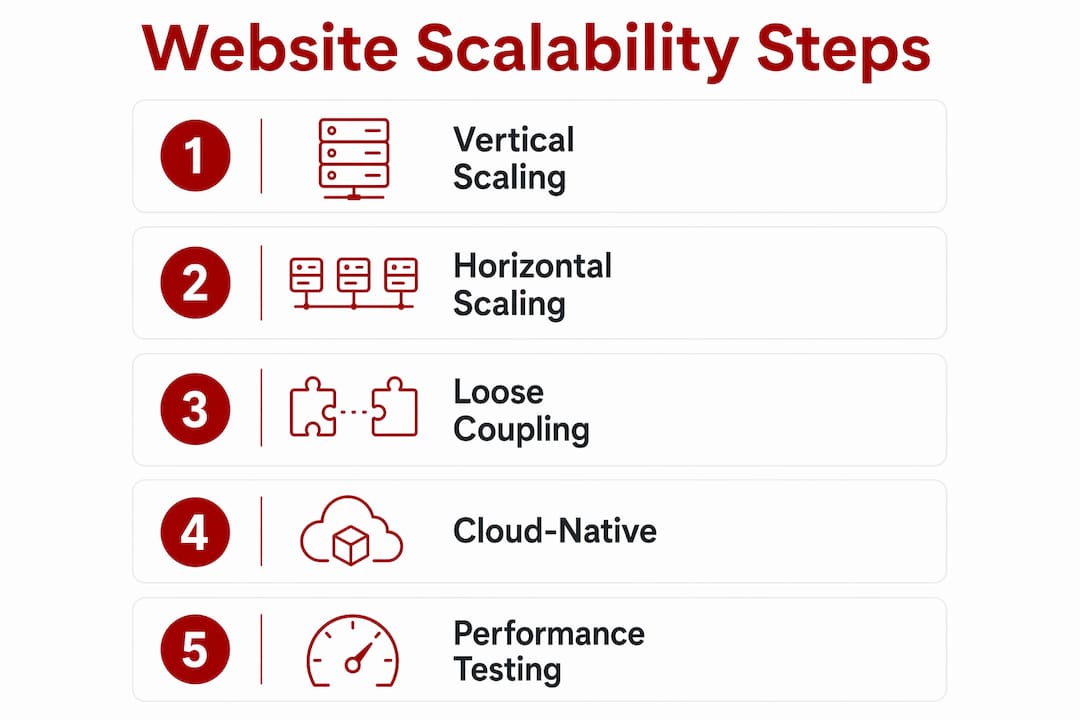
Cloud-native infrastructure, such as services offered through AWS, Google Cloud, or Microsoft Azure, is the preferred environment for scalable web design. These platforms allow you to add or remove resources on demand, which keeps costs aligned with actual usage rather than peak-capacity guesses.
Pro Tip: If you are planning a new website or a significant rebuild, ask your developer to explain how the frontend, backend, and database are separated. If they cannot answer clearly, that is a signal worth taking seriously.
Scaling a website well follows a layered approach. You address the cheapest and highest-impact changes first, then move to infrastructure upgrades only when the evidence supports it. Here is the order that works in practice:
Implement caching. Caching stores frequently requested data so the server does not have to regenerate it for every visitor. HTTP caching, object caching with tools like Redis or Memcached, and a content delivery network (CDN) like Cloudflare all reduce server load significantly. Caching with Redis or Memcached can reduce database load by 70%. That is a substantial gain before you spend a dollar on new hardware.
Optimise your database. Most performance bottlenecks live in the database, not the server. Adding indexes to frequently queried columns is often the single most cost-effective change you can make. Database index optimisation delivers a 10x performance improvement at a fraction of the cost of infrastructure upgrades. Use the SQL EXPLAIN command to identify slow queries and target your indexes precisely.
Add load balancing. A load balancer distributes incoming traffic across multiple servers so no single machine becomes a bottleneck. Combined with autoscaling, which automatically adds or removes servers based on traffic levels, this approach handles variable demand without manual intervention. Autoscaling with load balancers and health checks allows systems to manage traffic spikes efficiently.
Use a CDN for static assets. Images, stylesheets, and scripts can be served from servers geographically close to your visitors. This reduces latency and takes pressure off your origin server.
| Scaling method | Cost | Complexity | Best for |
|---|---|---|---|
| Caching (Redis, Memcached) | Low | Low | All sites |
| Database index optimisation | Very low | Low | Data-heavy sites |
| CDN (e.g., Cloudflare) | Low | Low | All sites |
| Load balancing | Medium | Medium | High-traffic sites |
| Horizontal scaling | High | High | Enterprise growth |
Pro Tip: Start with caching and database optimisation before considering infrastructure upgrades. Most small business websites have significant performance gains available at the code and configuration level that cost very little to implement.
The most common mistake business owners make is assuming that paying for a bigger server will fix a slow website. Adding resources without addressing code-level problems rarely solves the underlying issue. Performance problems usually live in the application logic or the database, not the hardware.
Here are the pitfalls that cause the most damage:
“Avoid premature optimisation; scale incrementally in response to verified growth signals.” This principle, drawn from scalable website planning, is the most practical guide for small business owners who want to grow without overcomplicating their setup.
Pro Tip: Schedule a load test at least once a year, or before any major campaign or product launch. Knowing your site’s breaking point in advance gives you time to fix it calmly rather than scrambling during a live event.
The business case for scalable web design goes well beyond avoiding crashes. A site built to grow with you delivers measurable advantages across several areas.
Consistent performance during traffic surges protects your brand reputation and keeps conversion rates stable when it matters most. A site that stays fast during a product launch or a media mention turns that attention into revenue rather than lost opportunities.
Scalable architecture also makes it easier to add new features and integrations over time. When your frontend, backend, and database are decoupled, a developer can add a booking system, a membership area, or a WooCommerce store without rebuilding the entire site. This flexibility is a direct financial benefit. It means your website grows with your business rather than becoming a bottleneck.
There is also a meaningful SEO benefit. Google’s Core Web Vitals measure page speed and stability as ranking signals. A site that loads quickly and reliably under load performs better in search results than one that slows down under pressure. For Canberra businesses competing for local search visibility, this is a practical advantage worth building for.
| Non-scalable website | Scalable website |
|---|---|
| Crashes under traffic spikes | Handles surges without performance loss |
| Requires full rebuilds to add features | Supports modular feature additions |
| Slow load times hurt SEO rankings | Fast, stable performance supports rankings |
| Higher long-term rebuild costs | Lower cost of incremental improvements |
You can explore how modular design supports growth in more detail if you are assessing your current site’s architecture. For businesses thinking about how their website supports client acquisition, the connection between scalability and website-driven client growth is worth understanding early.
Website scalability is a strategic business decision that determines whether your site supports or limits your growth.
| Point | Details |
|---|---|
| Define scalability early | Build for growth from the start, not as an afterthought after problems appear. |
| Caching delivers fast wins | Redis or Memcached can cut database load by 70% at low cost and complexity. |
| Database indexing is underrated | A 10x performance gain is available through index optimisation before any hardware upgrade. |
| Session management matters | Externalise session storage before adding servers or horizontal scaling will break user sessions. |
| Test before you need to | Load testing before campaigns or launches finds bottlenecks while you still have time to fix them. |
I have worked with enough small business owners to know that scalability rarely feels urgent until the site falls over at the worst possible moment. A product launch, a radio mention, a viral social post. The traffic arrives and the site cannot handle it. That moment is avoidable, and the fix is almost never as expensive as people fear.
The mistake I see most often is treating the database as an afterthought. Founders and developers focus on design, features, and launch speed, then discover six months later that a handful of unindexed queries are choking the entire site. The fix takes an afternoon. The delay cost months of sluggish performance.
The other pattern I see is the opposite problem: over-engineering a site that does not yet need it. A small consultancy with 300 monthly visitors does not need a microservices architecture. It needs clean code, good caching, and a hosting environment that can grow with it. Complexity added too early creates maintenance burden without any real benefit.
My honest view is that scalability requires future-readiness from inception, but that does not mean building everything at once. It means making decisions today that do not close off options tomorrow. Choose a platform and architecture that can grow. Keep components decoupled. Monitor performance regularly. Scale when the data tells you to, not when anxiety does.
Small, steady habits create a strong foundation. A monthly check of your site’s load time, a quarterly review of your database queries, and a load test before major campaigns will keep you ahead of most problems before they become costly ones.
— James
If you are a Canberra business owner thinking about whether your current website can support your next phase of growth, Asporeadigital builds WordPress websites with scalability in mind from the first conversation.

Every project is scoped around your business outcomes, not just the design. That includes performance-ready hosting through Asporea Hosting, modular WordPress builds that can grow with you, and practical advice on where your current site may be holding you back. Whether you are starting fresh or improving what you have, the focus is always on a site that works harder as your business grows. Explore how WordPress supports digital marketing growth for Canberra small businesses and see what a well-built foundation looks like in practice.
Website scalability is the ability of a site to handle more traffic, data, and features without slowing down or breaking. A scalable site grows with your business rather than holding it back.
Vertical scaling adds more power to a single server, while horizontal scaling adds more servers behind a load balancer. Horizontal scaling supports greater long-term growth but requires careful architecture planning.
Caching stores frequently requested data so the server does not regenerate it for every visitor. Tools like Redis and Memcached can reduce database load by 70%, which significantly improves performance under traffic pressure.
Database indexes allow queries to find data faster without scanning entire tables. Proper indexing can deliver a 10x performance improvement at very low cost, often before any infrastructure upgrade is needed.
From the beginning. Building scalability into the foundation of a website is far less expensive than retrofitting it later. Even a small business site benefits from clean architecture, good caching, and a hosting environment that can grow.

Practical digital learning for business owners. Start with Asporea Digital Academy’s free course on why your website isn’t ranking.

As email lists grow, pricing increases and platforms become harder to use, even though the work stays the same. This article looks at why that

Followers feel good but don’t pay bills. Use social for awareness and your website to convert into enquiries, bookings and sales.
