

Blog

When Meta Cuts You Off, What Happens to Your Business?
What happens if Meta cuts off your Facebook or Instagram tomorrow? Why your website should be the centre of your business, not social media.

TL;DR:
- User experience in web design involves creating digital interactions that are usable and goal-oriented beyond just visual appeal. It significantly impacts website performance, user engagement, and search rankings, with fast, stable sites reducing bounce rates and increasing conversions. Investing early in UX, measuring task success, and continuously testing with real users can deliver substantial benefits for businesses, while AI tools cannot replace the human judgment necessary for effective UX design.
User experience in web design is the practice of shaping digital interactions so that visitors find a website usable, purposeful, and successful in meeting their goals. It goes well beyond visual appeal. UX encompasses the logic of how a site is structured, how quickly it responds, how clearly it communicates, and whether it guides users toward a meaningful outcome. Google’s Core Web Vitals, the Nielsen Norman Group’s research frameworks, and performance data from Smashing Magazine all confirm the same truth: poor UX costs businesses real money, while good UX compounds returns over time. For web designers, developers, and business owners, understanding why user experience matters in web design is not optional. It is the foundation of every decision that follows.
User experience and site performance are inseparable. When a page loads slowly or behaves unpredictably, users leave. When it loads fast and responds cleanly, they stay and convert.

Google’s Core Web Vitals measure three fundamental UX signals: Largest Contentful Paint (LCP), Interaction to Next Paint (INP), and Cumulative Layout Shift (CLS). The thresholds that matter are LCP under 2.5 seconds, INP under 200 milliseconds, and CLS under 0.1, measured across 75% of real users. These are not arbitrary benchmarks. They reflect the point at which users begin to notice friction and disengage. Missing these thresholds does not just affect satisfaction. It affects search rankings, because Google uses Core Web Vitals as a ranking signal.
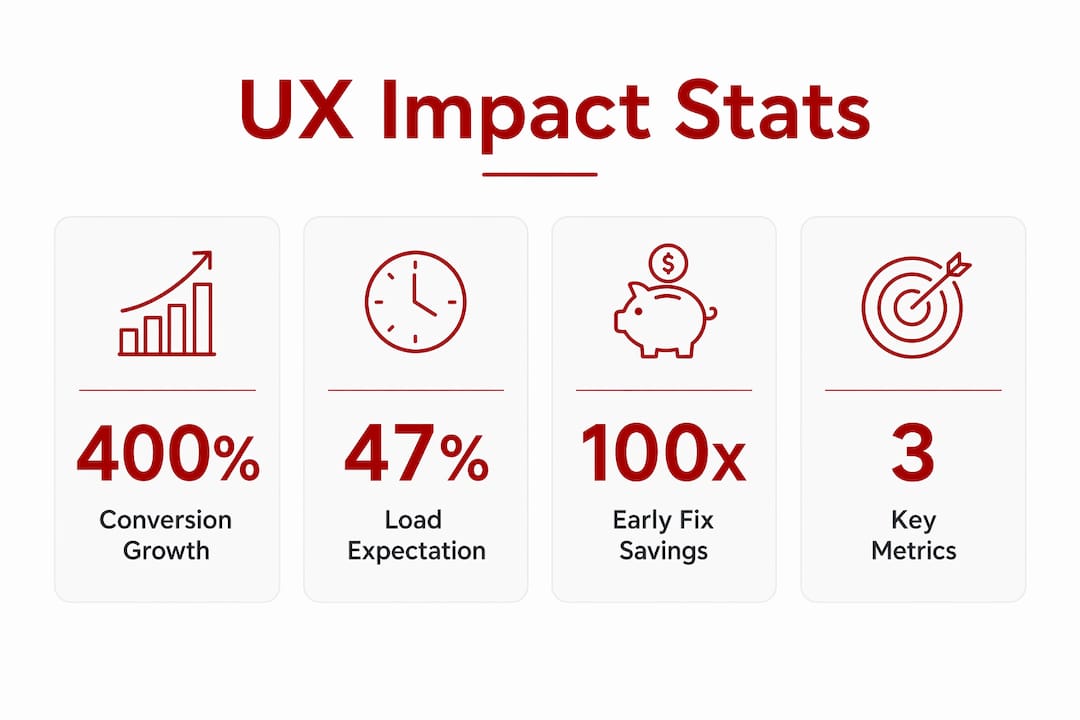
The numbers behind load time are sobering. 47% of users expect a page to load in two seconds or less, and a one-second delay can reduce conversions by 20% and satisfaction by 16%. When mobile load time moves from one second to three seconds, bounce rate spikes by 32%. That means roughly one in three mobile visitors abandons a site simply because it was too slow. For a Canberra trades business or allied health provider relying on website enquiries, that is a significant and preventable loss.
Behavioural psychology also shapes how users interact with pages. Hick’s Law states that the more choices a user faces, the longer they take to decide. Too many navigation options, competing calls to action, or cluttered layouts all create decision fatigue that pushes users away. The Goal Gradient Effect shows that users accelerate toward a goal as they feel closer to completing it. A well-structured checkout or booking flow that shows clear progress will outperform a flat, undifferentiated form every time.
Pro Tip: Use Google Search Console alongside PageSpeed Insights to identify which specific pages are failing Core Web Vitals thresholds. Fix the highest-traffic pages first, since that is where performance gains translate directly into revenue.
| UX metric | What it measures | Good threshold |
|---|---|---|
| LCP (Largest Contentful Paint) | How fast the main content loads | Under 2.5 seconds |
| INP (Interaction to Next Paint) | How quickly the page responds to input | Under 200 milliseconds |
| CLS (Cumulative Layout Shift) | Visual stability during load | Under 0.1 |
User interface design is a component of UX, not a synonym for it. UI focuses on the visual layer: typography, colour palettes, button styles, and layout grids. UX covers the entire system, including how content is organised, how tasks flow from start to finish, and whether the site actually solves the user’s problem.
The Nielsen Norman Group is direct on this point: equating UX only with UI leads to UX being undervalued across organisations. The most impactful UX work shapes the underlying logic and behaviour of a system, not just its surface appearance. A beautifully designed page that buries the phone number, uses vague button labels, or requires five clicks to reach a contact form is a UI success and a UX failure.
This distinction matters practically. AI-generated UI components can now produce polished visual layouts in minutes. Tools like Figma’s AI features and various design-to-code platforms accelerate the visual layer significantly. But they cannot replace the human judgement required to understand user goals, map logical task flows, or identify where a real user gets confused. UX requires research, testing, and iteration. It cannot be automated away.
Pro Tip: When reviewing a website design, ask one question before approving any page: “Can a first-time visitor complete the primary task on this page without asking for help?” If the answer is uncertain, the UX needs work regardless of how polished the visuals are.
| Aspect | User interface (UI) | User experience (UX) |
|---|---|---|
| Focus | Visual design and aesthetics | System behaviour and task completion |
| Scope | Buttons, colours, typography | Navigation logic, content clarity, flow |
| Measured by | Visual consistency | Conversion rate, task success, satisfaction |
| Can AI automate it? | Largely, yes | No. Requires human research and testing |
The business case for UX investment is well documented and the returns are significant. A well-designed UX can improve conversion rates by up to 400%, reduce customer support costs, and increase retention. That figure is not a ceiling. It reflects what happens when UX moves from poor to genuinely good across a site’s core user journeys. For a small business generating leads through its website, even a modest improvement in conversion rate can mean the difference between a quiet month and a full enquiry pipeline.
The cost argument is equally compelling. Early UX fixes can be up to 100 times cheaper than corrections made after a site has launched. Discovering that a booking form confuses users during a prototype test costs an hour of revision. Discovering the same problem six months after launch, after losing hundreds of potential bookings, costs far more. This is why investing in UX early is one of the most commercially sound decisions a business can make.
The benefits extend beyond customer-facing outcomes. Adobe’s research confirms that UX investment also improves internal workforce productivity, an ROI that is frequently overlooked. When staff use internal tools or client portals with clear, logical interfaces, they complete tasks faster and make fewer errors. For a small business owner managing bookings, invoices, and enquiries through a website backend, a well-designed admin experience saves real time each week.
There is also a competitive gap worth noting. 80% of companies believe they provide superior UX, but only 8% of customers agree. That gap represents a genuine opportunity. Most businesses are overestimating the quality of their digital experience. The ones that measure honestly and improve deliberately will stand apart from competitors who assume their site is performing well.
Applying strong UX does not require a large budget or a dedicated research team. It requires a clear process, honest measurement, and a willingness to test assumptions before treating them as facts.
Monitor Core Web Vitals consistently. Use Google Search Console and tools like DebugBear to track LCP, INP, and CLS across your real user base. Optimising average metrics alone risks missing segments of users who are experiencing poor performance. Look at distributions, not just averages, to understand where your site is genuinely failing.
Use rapid prototyping and design disposables. The Nielsen Norman Group’s research on design disposables shows that quick, low-fidelity prototypes accelerate learning cycles. Build something testable fast, gather real feedback, discard what does not work, and iterate. AI tools can speed up the creation of these artefacts, but they require deliberate evaluation to avoid skipping the user insight step entirely.
Write in plain language. Users typically read only 20 to 28% of page text and scan for key information. Writing at a lower reading grade level benefits all literacy levels and speeds up comprehension. Every page on your site should answer the user’s primary question within the first two sentences of the main content block.
Measure task completion, not just traffic. As AI-generated search previews reduce clickthroughs, UX success metrics need to shift toward engagement, task completion, and satisfaction rather than raw page views. Set up goal tracking in Google Analytics 4 for key actions: form submissions, phone number clicks, booking completions, and file downloads.
Test with real users regularly. Even informal usability testing with five participants reveals the majority of significant UX problems. Ask someone unfamiliar with your site to complete a specific task while thinking aloud. The insights from one session will outweigh weeks of assumption-based design decisions. Pair this with conversion-focused UX reviews to identify where your site is losing potential customers.
Pro Tip: Set a recurring calendar reminder every quarter to run a Core Web Vitals check and a brief usability review. Small, steady habits in UX maintenance prevent the kind of gradual performance decay that goes unnoticed until it becomes a serious problem.
Good UX design directly drives conversion rates, reduces costs, and builds the kind of trust that turns website visitors into paying customers.
| Point | Details |
|---|---|
| UX is not UI | UX covers system logic and task flow, not just visual design. |
| Performance is UX | A one-second load delay reduces conversions by 20%, making speed a business priority. |
| Early investment pays | Fixing UX before launch costs up to 100 times less than post-launch corrections. |
| Measure task completion | Track form submissions and bookings, not just page views, to gauge real UX quality. |
| The experience gap is real | 80% of companies overestimate their UX quality. Honest measurement creates competitive advantage. |
Working with small businesses across Canberra has taught me something that no research paper quite captures: most business owners know their website is not performing well, but they assume the problem is traffic. It rarely is. The problem is almost always experience.
I have seen sites with solid local SEO rankings that convert at a fraction of what they should, simply because the contact form is buried, the mobile layout breaks on common screen sizes, or the page takes five seconds to load on a 4G connection. Fixing those issues does not require a redesign. It requires honest diagnosis and methodical improvement.
What concerns me about the current AI-driven design moment is the temptation to treat visual polish as a proxy for UX quality. AI tools can generate beautiful layouts quickly. But a beautiful layout that confuses users is still a failure. The state of UX in 2026 demands that designers and business owners hold both things at once: aesthetics and function, speed and clarity, visual appeal and logical flow.
The businesses I see winning online are not the ones with the most elaborate websites. They are the ones that have taken the time to understand what their customers actually need, and then built a site that delivers it without friction. That is UX in practice. It is not glamorous work, but it is the work that compounds.
— James

If your website is attracting visitors but not converting them into enquiries or bookings, the issue is almost certainly UX. Asporea Digital builds fixed-price WordPress websites for Canberra small businesses with UX built into every stage of the process, from structure and content to mobile performance and load speed. Every site is scoped around your business goals, not just your design preferences. If you want to understand how smart web design drives sales for Canberra businesses like yours, that is exactly where to start. Asporea Digital also offers website reviews and practical advice for businesses that want to improve an existing site before committing to a full rebuild.
User experience in web design is the practice of designing websites so that visitors can find information, complete tasks, and achieve their goals without friction. It covers site structure, load speed, content clarity, and navigation logic, not just visual design.
A well-designed UX can improve conversion rates by up to 400%, according to Smashing Magazine’s research. Even small improvements to page speed, form design, and content clarity can produce measurable increases in enquiries and sales.
Core Web Vitals are Google’s three key UX performance metrics: LCP (load speed), INP (responsiveness), and CLS (visual stability). Sites that meet the good thresholds for these metrics tend to rank higher in search results and retain more visitors.
No. UI design focuses on the visual layer of a website, including colours, typography, and button styles. UX covers the entire user journey, including how tasks flow, how content is organised, and whether the site actually solves the user’s problem.
A practical routine is a Core Web Vitals check and a brief usability review every quarter. This catches gradual performance decay early and keeps the site aligned with how real users are behaving, particularly as device usage and search behaviour continue to shift.

What happens if Meta cuts off your Facebook or Instagram tomorrow? Why your website should be the centre of your business, not social media.

A newsletter keeps you in touch with interested visitors. Stay useful, stay remembered, and bring people back to your website when they’re ready.

If your site leaves strangers unsure, they leave. Learn the simple tweaks that make enquiries feel easy and natural.
