

Blog

Simple Steps to Protect Your Logins With 2FA
Protect your business accounts with two-factor authentication. Learn how to add 2FA to your email, website, hosting, and WordPress logins.

TL;DR:
- Effective small business content management involves planning, organizing, and maintaining digital content throughout its full lifecycle to ensure consistency and accessibility. A proper strategy and structured processes, supported by tools like WordPress, prevent digital clutter, outdated assets, and inefficient workflows. Building simple habits such as consistent naming, folder structures, and regular audits can significantly improve content reuse, brand coherence, and scalability over time.
Most small business owners put a lot of energy into creating content. Blog posts, social media updates, service pages, product photos. But creating content and managing it are two very different things. What is content management, exactly? It is the full process of planning, organising, storing, publishing, and maintaining your digital content so it stays useful, consistent, and easy to find. Content problems are often systemic rather than creative, and understanding the difference can save you a surprising amount of time and frustration.
| Point | Details |
|---|---|
| More than just creation | Content management covers the full lifecycle from planning and storage to governance and archiving. |
| Strategy before tools | Building processes and folder structures before choosing software prevents digital hoarding and bottlenecks. |
| Governance matters | Clear guidelines for tone, approval, and compliance protect brand consistency and reduce rework. |
| CMS is one part | A content management system is a useful tool, but it does not replace a sound content strategy. |
| Small steps compound | Starting with simple naming conventions and workflows produces steady, measurable improvements over time. |
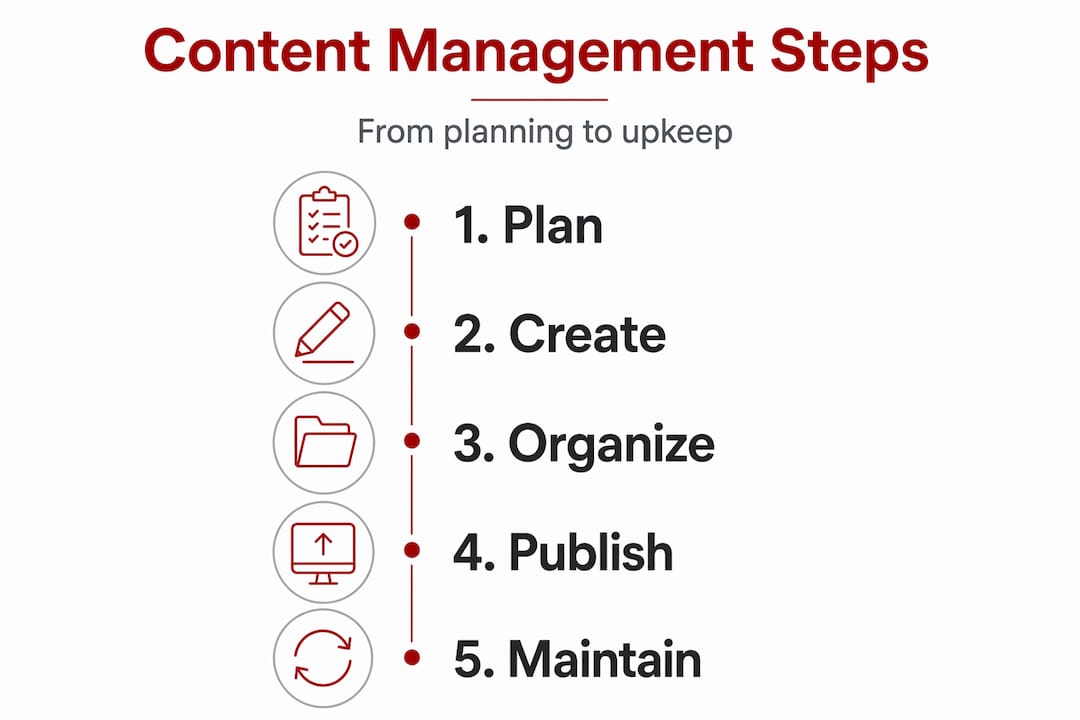
People often use “content management” to mean picking a website platform or scheduling social posts. That is understandable, but it is too narrow. What content management actually involves is controlling the full lifecycle of your digital content, from the initial idea through to publication, maintenance, and eventual retirement.
Here is what that lifecycle looks like in practice:
It is worth separating two things that often get confused. Content marketing strategy focuses on what to create and why, who your audience is, and what outcomes you want. Content management strategy focuses on the internal governance and workflows that make sure the right content gets created, approved, and published correctly. You need both, but they are different disciplines.
Without a management process in place, you end up with duplicated files, outdated service descriptions, inconsistent brand language, and staff (or yourself) spending hours searching for assets that should take seconds to find.
A content management system, or CMS, is software that lets you create, edit, and publish digital content without needing to write code. WordPress is the most widely used example for small businesses, and for good reason. It handles the technical side of publishing so you can focus on the content itself.
A CMS handles your web pages and blog posts well. But when you start accumulating photos, videos, PDFs, brand assets, and other rich media, a separate Digital Asset Management (DAM) system becomes worth considering. A CMS and a DAM serve different purposes and often work best alongside each other.
| Feature | CMS (e.g. WordPress) | DAM system |
|---|---|---|
| Best for | Web pages, blog posts, structured content | Images, videos, PDFs, brand assets |
| Primary use | Publishing and updating website content | Storing and organising digital media files |
| Key benefit | Easy publishing without coding | Searchable, tagged media library |
| Typical user | Small business owner, content editor | Marketing team, designer, larger organisation |
When choosing any content system, the features worth prioritising are metadata tagging, version control, and workflow management. Metadata capability is particularly important. If your content is not properly tagged and labelled, it becomes unsearchable as your library grows. Version control lets you track changes and revert to earlier drafts. Workflow features route content through creation, review, and approval before it goes live.
Pro Tip: Set up categories, tags, and custom fields in WordPress from the very beginning. Retrofitting a tagging structure onto hundreds of existing posts is time-consuming. A few minutes of setup early on saves significant effort later.
The bigger caution here is assuming that selecting the right software solves your content problems. Small business owners frequently focus on the tool and neglect the process, which leads to digital hoarding and publishing bottlenecks regardless of which platform they use.

Good content management does not require a complicated system. It requires consistent habits and a clear process. Here is a practical approach for individuals and small business owners.
Create a folder structure before you start. Decide how you will organise files, whether by content type, date, campaign, or topic, and stick to it. A flat folder of 400 loosely named files is the most common content problem Asporeadigital sees.
Use consistent naming conventions. Something like "service-page-plumbing-canberra-v2-2026.docxis far more useful thanfinal-FINAL-new.docx`. Include the content type, topic, version, and date in every file name.
Build an approval workflow, even a simple one. Content workflows move content from idea to publication through agreed steps: drafting, review, approval, and scheduling. For a solo operator, this might just mean a checklist. For a small team, a shared project tool keeps everyone aligned.
Write a simple content governance document. This does not need to be lengthy. Cover your brand voice, preferred spelling conventions (yes, Australian English matters), image standards, and who approves content before it publishes. Governance guidelines are often skipped by small businesses, and the result is inconsistent messaging that erodes trust over time.
Audit your content regularly. Set a reminder every six months to review your website pages, blog posts, and stored assets. Remove what is outdated, update what is stale, and note any gaps.
Structure content for future scalability. AI-ready content is modular, tagged with metadata, and not buried in page layouts designed only for human reading. If you ever plan to use AI tools to personalise or repurpose content, structured content gives you a significant head start.
Pro Tip: Before you invest time in a new CMS or content tool, spend an hour documenting your current process. Write down how content gets created, who reviews it, where it is stored, and how it gets published. You will quickly see where the real bottlenecks are.
The importance of content management is easy to overlook when things are small and manageable. But poor habits compound quickly.
Consider a Canberra-based allied health practice managing service descriptions, referral documents, consent forms, and blog content. Without a system, staff regularly publish outdated fee schedules and cannot locate the latest version of patient forms. With a simple CMS setup, a naming convention, and a short governance document, those problems largely disappear within a month.
Even with the best intentions, certain habits undermine content management efforts. These are the patterns worth watching for:
The most reliable content management systems are not the most sophisticated ones. They are the ones people actually use consistently.
Small, steady habits create a strong foundation. Start with one change, such as a naming convention or a simple approval checklist, and build from there.
I’ve worked with a lot of small business owners in Canberra and the surrounding region, and the pattern is almost always the same. They spend money on a website or a social media tool, then assume the problem is solved. What I’ve learned is that the tool is rarely the problem.
The uncomfortable truth is that most content problems come from the absence of a process, not the absence of software. I’ve seen businesses with well-built WordPress sites still struggling because nobody agreed on how to name a file, who approves a new page, or when old content gets updated. The site looks fine. The content management is a mess.
What actually works, in my experience, is starting embarrassingly small. A shared Google Doc with naming rules. A two-step approval process. A calendar reminder for quarterly content reviews. These are not glamorous. But they compound. Within six months, the business has a content library it can actually use, and publishing new content takes a fraction of the time.
I’d also encourage you to think ahead. Structured content with metadata is not just good practice today. It is what will allow AI tools to help you work smarter tomorrow. The businesses that build good habits now will have a genuine advantage as content demands continue to grow.
— James
If you are ready to take content management seriously, having the right platform underneath everything makes a real difference. WordPress remains the most practical choice for small businesses because it supports structured content, flexible content marketing, and ongoing management without locking you into a closed system.

Asporeadigital builds WordPress websites for Canberra small businesses that are designed to be managed, not just launched. That means clean content structures, sensible categories, and a setup you can actually maintain. If you are running an online store, the WordPress and WooCommerce guide covers how to manage product content effectively at every stage of growth. For ongoing content upkeep, website management services take the routine maintenance off your plate so you can focus on running your business.
Content management involves planning, creating, organising, storing, publishing, and maintaining digital content. It covers the full lifecycle of content, from the initial idea through to archiving or removal.
A content management system (CMS) is software that lets you create and publish digital content without writing code. WordPress is a common example used by small businesses to manage website pages and blog posts.
Good content management reduces duplicated effort, protects brand consistency, and makes it easier to find and reuse existing assets. Without it, content quickly becomes disorganised, outdated, and difficult to maintain.
Start with a clear folder structure, consistent file naming conventions, and a simple approval process before content is published. These three habits alone will produce a noticeable improvement within weeks.
A CMS is a tool for publishing content. A content management strategy is the process and governance framework that guides how content is planned, created, reviewed, and maintained. You need both, and the strategy should come first.

Protect your business accounts with two-factor authentication. Learn how to add 2FA to your email, website, hosting, and WordPress logins.

Clubs are moving membership renewals online to reduce admin, free up front desk staff and make dues, payments and member updates easier to manage.

Build trust without sounding salesy. Add proof, clear steps, and risk reducers so visitors feel safe to enquire or buy.
