
Blog

Turning One-Time Buyers into Loyal Subscribers
Subscription websites build steady income and loyalty. Learn the difference in WooCommerce and see if it’s right for your business.

TL;DR:
- E-commerce features are essential tools that enhance online store functionality, improve customer trust, and boost sales. Proper prioritization and gradual implementation of these features, combined with automation and regular reviews, help small businesses grow efficiently while avoiding unnecessary complexity. Connecting your store with broader business systems maximizes efficiency and creates a seamless customer journey.
E-commerce features are specialised tools and functionalities built into online stores to improve the shopping experience, increase sales, and reduce the manual work of running a store. For small business owners, understanding why use e-commerce features matters as much as choosing the right ones. Platforms like Shopify and WooCommerce have made these tools accessible to businesses of any size, but the real value lies in how they work together. Nearly 70% of online shopping carts are abandoned due to missing core features like simple navigation, fast checkout, and clear trust signals. That single statistic tells you everything about the cost of getting this wrong.
The right features do not just make your store look polished. They directly influence whether a visitor buys or leaves. Here are the core functionalities every small business store needs to prioritise.
Pro Tip: Even a 0.1-second improvement in page load speed increases conversions by 8.4%. Test your store speed with Google PageSpeed Insights and treat slow load times as a direct revenue problem.
One often-overlooked detail is guest checkout. Allowing guest checkout increases post-purchase review collection from 1–2% up to 10–20%. Forcing account creation before purchase is one of the most common reasons customers abandon their cart. Remove that barrier and you recover both the sale and the social proof that follows it.

Automation is where the importance of e-commerce features becomes most visible for small business owners managing limited time and staff. The benefits are concrete and measurable.
The numbers behind automation are compelling. Implementing automation in core e-commerce operations boosts productivity by 20–30% and reduces manual errors by up to 80%. Inventory automation alone cuts holding costs by 5–10%. These are not marginal gains. They represent real money and real time returned to your business.
| Area | Without Automation | With Automation |
|---|---|---|
| Order processing time | Minutes per order, manually | Seconds per order, triggered automatically |
| Inventory accuracy | Prone to human error | Real-time sync across channels |
| Customer communications | Manual follow-up required | Triggered emails sent automatically |
| Reporting | Compiled manually | Live dashboard, always current |
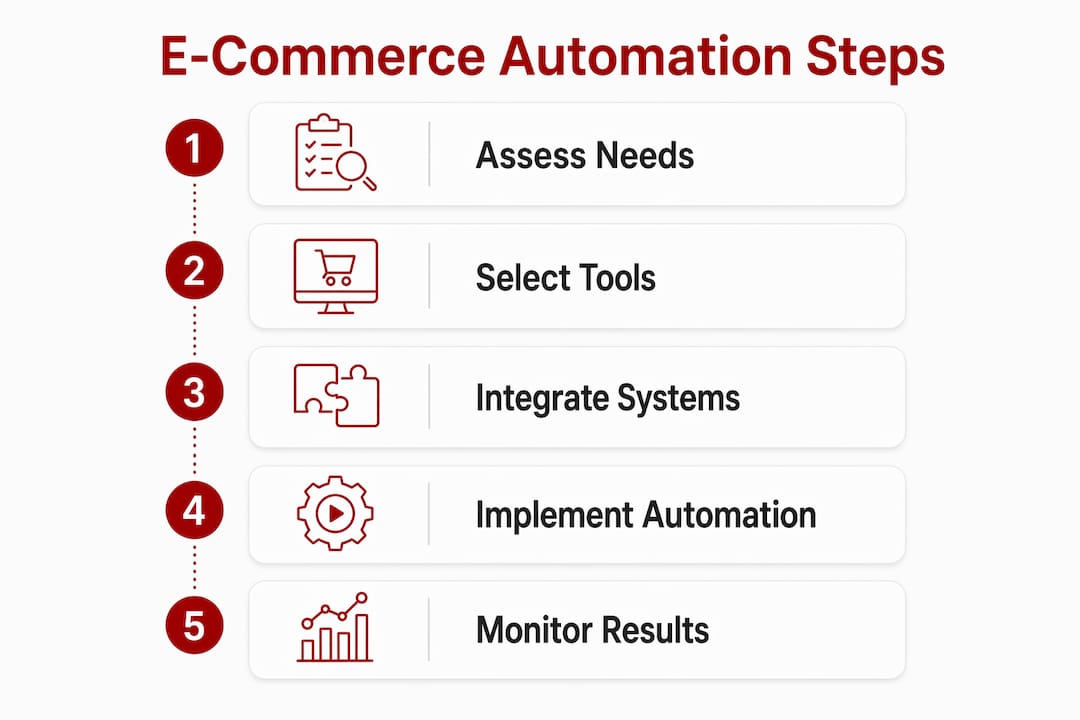
Unified e-commerce platforms integrating commerce and order management deliver a 119% ROI over three years, with 30–40% less case handling time. That figure comes from a Forrester TEI study commissioned by Salesforce. It reflects what happens when your tools talk to each other rather than operating in silos.
Pro Tip: If you are using WooCommerce, explore website automations for small business to reduce admin and connect your store to your broader business systems.
E-commerce automation also enables businesses to scale without increasing staff headcount proportionally. You can handle more orders, more customers, and more complexity without hiring additional people to manage routine tasks.
Choosing the wrong features, or too many at once, creates its own set of problems. “Tool fatigue” is a real risk for small businesses. It occurs when you layer too many platforms and integrations on top of each other, leading to wasted spend, confused workflows, and a store that is harder to manage than it should be.
The smarter approach is to build your feature stack in stages:
Experts advise focusing e-commerce feature rollout in layers rather than all at once to avoid cost waste and complexity. Start with what directly affects the customer experience, then build outward from there.
Personalisation deserves a specific caution. Personalisation can lift conversion rates by 5–15%, but it must be balanced carefully. Customers notice when product suggestions feel intrusive or when a site seems to know too much about their browsing habits. The goal is to be helpful, not unsettling.
Stores that review their software stack annually reduce software costs by 22% while maintaining output. Schedule a yearly audit of every tool you are paying for. Ask whether each one is actively contributing to sales or customer experience. If it is not, remove it rather than searching for a cheaper version. Eliminating redundant tools beats negotiating discounts on tools you do not need.
Putting the right features in place does not require a large budget or a technical background. It requires a clear process and a willingness to start with what matters most.
Pro Tip: On-site search is one of the highest-return features you can add. Look for search tools that handle typos and synonyms automatically. No-results recovery in search captures buyers who would otherwise leave silently after a failed search.
The advantages of WooCommerce stores for small businesses include deep integration with WordPress, a large library of extensions, and full control over your data and hosting environment. For Canberra businesses already running WordPress sites, adding WooCommerce is often the most practical path to a functioning online store.
E-commerce features directly determine whether your online store converts visitors into buyers or loses them before checkout.
| Point | Details |
|---|---|
| Core features drive conversions | Navigation, mobile design, secure payments, and on-site search are the highest-priority features to get right first. |
| Automation reduces cost and error | Automating inventory, orders, and communications cuts manual errors by up to 80% and boosts productivity by 20–30%. |
| Layer your feature rollout | Start with foundational tools, then add growth and support features once the basics are working well. |
| Audit your tech stack annually | Removing redundant tools reduces software costs by 22% without reducing output. |
| Personalisation needs a light touch | Conversion lifts of 5–15% are possible, but over-reliance on AI-driven suggestions risks alienating customers. |
Working with small businesses across Canberra and the Capital Territory, I have noticed a consistent pattern. Most owners know they need an online store. Far fewer know which features actually move the needle. The instinct is often to add more: more plugins, more integrations, more automation tools. The result is usually a store that is slower, harder to manage, and no better at converting visitors.
The businesses that do well online tend to start with a clear view of where their customers get stuck. Is the checkout too long? Is the mobile experience broken? Does the search return no results for common product names? These are friction points, and fixing them costs far less than adding a new feature layer on top of a broken foundation.
My honest observation is that the e-commerce features advantages most worth pursuing are the ones your customers will notice immediately. Speed. Clarity. Trust. Everything else is secondary until those three are solid.
The other thing I would encourage you to think about is the relationship between your website and your broader business systems. A store that connects to your accounting, your inventory, and your customer communications is genuinely more useful than one that operates in isolation. That connection is where the real efficiency gains live. If you are curious about investing in e-commerce for your business, start by mapping the customer journey from first visit to completed purchase. Every point of friction you find is an opportunity.
— James
If you are a small business owner in Canberra or the surrounding region and you want a WooCommerce store that actually performs, Asporeadigital builds fixed-price WordPress and WooCommerce websites designed around your business outcomes.

Every build includes mobile-optimised design, fast load times, secure payment integration, and the core features your customers expect. Asporeadigital also handles hosting, maintenance, and ongoing support through Asporea Hosting, so you are never left managing technical problems on your own. If you want to understand what a well-built online store can do for your sales, start with the advantages of WooCommerce stores and see how the right platform choice shapes everything that follows.
E-commerce features are the tools and functionalities built into an online store to improve the shopping experience, increase conversions, and reduce manual operations. They include navigation design, payment processing, on-site search, inventory management, and customer review systems.
Missing core features like fast checkout and clear trust signals cause nearly 70% of shopping carts to be abandoned. For small businesses, each abandoned cart is a lost sale that the right features could have prevented.
Start with mobile-friendly design, secure payment processing, clear navigation, and fast page load speeds. These foundational features have the greatest direct impact on whether a visitor completes a purchase.
Automation handles routine tasks like order processing, stock updates, and customer emails without manual input. This reduces errors by up to 80% and frees up time you can direct toward growing your business.
Review your full software stack at least once a year. Stores that do this consistently reduce software costs by 22% by removing tools that overlap or no longer contribute to sales or customer experience.

Subscription websites build steady income and loyalty. Learn the difference in WooCommerce and see if it’s right for your business.

Buying a domain is only step one. This plain English guide explains hosting, why builders like Wix can become limiting, and the smarter way to

Cut junk enquiries, protect your attention, and keep real customers from getting buried. A plain English guide to spam, bots, forms, and safer inbox habits.
