

Blog

Online Booking That Takes Pressure Off Your Receptionists
Online booking reduces calls, cuts reception pressure, improves confirmations and helps clinics secure appointments faster.

Shopify is a good ecommerce platform.
For many businesses, Shopify is the right choice. It gives you hosting, checkout, product management, payments, themes and a managed store environment in one service. It helps you to get products online quickly and when your store fits neatly inside Shopify’s way of working, it can make sense.
The trade-off with Shopify is control.
That’s primarily because Shopify is a hosted platform and when you build a Shopify store you’re using their system, their rules, checkout framework, app ecosystem and commercial model.
That does not automatically spell problems, but it might if you need your store to do something beyond the norm.
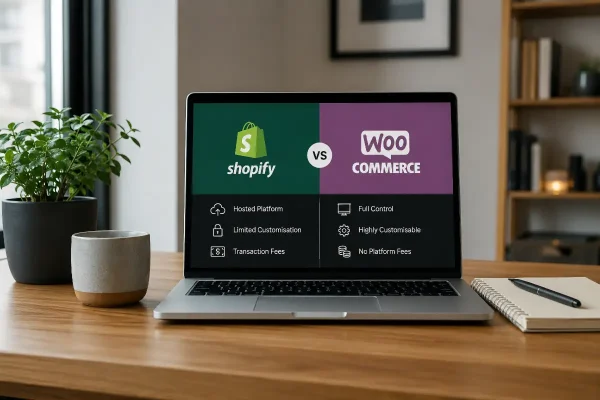
WooCommerce is a Shopify alternative that works differently. It runs on WordPress, so your store is part of your website. WooCommerce gives you ultimate flexibility to choose your web host, your payment provider, checkout structure, content layout, custom features and integrations with far fewer platform restrictions. Flexibility or customised needs is where WooCommerce can be a better fit. Not because every business needs complexity, but because some businesses need room to build the store around the way they actually operate.
One of the strongest advantages of WooCommerce is that it sits inside WordPress. The store does not sit beside the website, it is part of the website.
If your business relies on more than product listings – things like customised landing pages, blog articles and buying guides. Or more advanced features like downloads, booking pathways or lead magnets then WooCommerce is a better alternative. This will better suit businesses with customers that want to understanding more about your business before they buy.
WordPress handles that side really well. You can build detailed product education pages, advice sections, comparison content, resource libraries and local SEO pages without forcing every page to behave like a shopfront.
Shopify can publish content, but ecommerce is their bread and butter. WordPress is different becuase it is built for content structure and publishing. WooCommerce on top of WordPress lets the store operate inside that broader website structure.
For a business that needs to sell products and explain services, the website can support the whole customer journey, not just the transaction.
Shopify includes hosting as part of the platform.
You do not have to manage servers, caching, updates or technical hosting settings in the same way.
WooCommerce gives you the choice. In reality that is a responsibility but the benefit is control because you can choose hosting that suits the size, purpose and traffic profile of the store.
A small catalogue site does not need the same setup as a high-volume ecommerce store. A store with large images, complex product variations or traffic spikes may need stronger hosting than a basic shared plan. A business that wants local support can choose a provider that understands its market and can be reached when something goes wrong.
This is one of the reasons WooCommerce works well when it is managed properly. The business is not forced into a single platform hosting arrangement. The hosting can be matched to the store.
Cheap hosting is never the answer. A poorly hosted WooCommerce site can become slow, unstable and frustrating. With proper hosting, caching, security and maintenance, WooCommerce gives you infrastructure choice that Shopify does not.
Payment flexibility is one of the things that can dramatically improve your financial success.
Shopify encourages the use of Shopify Payments. If you want or need a different payment provider, additional transaction fees may apply depending on the plan and payment setup.
As you can imagine, over time, that can add up.
WooCommerce does not charge its own platform transaction fee simply because you choose a different gateway. You still pay the payment processor. Stripe, PayPal, Square and banks do not work for free. But WooCommerce itself is not taking an extra platform fee because you selected another provider.
You may want to use a particular bank, a local provider, manual payment, direct deposit, deposits, part-payments, account billing, subscriptions or a method that better suits your customers.
With WooCommerce, the question is usually whether the right gateway or payment process can be connected or built.
With Shopify, the question can become whether Shopify allows it, whether it requires a higher plan, and whether another fee applies.
Checkout is where the flexibility matters most.
Some stores need a basic checkout. Product, cart, payment, shipping and receipt. Shopify handles that well.
Other businesses need more than that. They may need customers to upload files before placing an order. They may need different checkout questions depending on the product. They may need trade customers to see different options. They may need local delivery rules, deposits, custom measurements, part-payments or product-specific instructions after purchase.
WooCommerce gives developers more room to customise checkout properly. Fields, logic, workflows and integrations can be shaped around the business process. That does not mean every checkout should be heavily customised. A cluttered checkout can kill sales. But where the business case is clear, WooCommerce gives you more practical control.
Shopify checkout customisation is more restricted. That is part of how Shopify keeps the platform controlled and consistent, but it also means some changes may require apps, workarounds or higher-tier plans.
For businesses with unusual products, service-based ecommerce, local delivery rules or operational steps behind each order, WooCommerce can be the better long-term fit.
WooCommerce is strong when the store needs custom development.
Because WooCommerce runs inside WordPress, developers can build features that match the way the business works. That might include custom dashboards, member pricing, quote requests, trade portals, calculators, product selectors, gated content, automated emails, custom reports or connections with other systems.
Shopify also supports custom development. It has APIs, themes, apps and developer tools. But the platform is more controlled, and many businesses end up stacking paid apps to solve problems that could otherwise be handled through more direct WordPress or WooCommerce development.
That app stack can become expensive. It can also become messy. One app handles subscriptions. Another handles product options. Another handles reviews. Another handles advanced discounts. Another handles shipping logic. Each app has its own fee, settings, limitations and possible conflicts.
WooCommerce has plugins too. A badly built WooCommerce site can become bloated just as easily. The difference is that WooCommerce gives you more freedom to decide whether a feature should be handled by a plugin, custom code or a more specific integration.
That flexibility matters when you do not want your business process shaped by whatever an app happens to allow.
With WooCommerce and WordPress, your products, pages, posts, customers, orders and content live in your own WordPress database. You can export it, report on it, extend it and connect it to other systems. You are also responsible for protecting it, backing it up and managing access properly.
That control is useful when a business needs custom reporting, CRM integration, membership logic, wholesale pricing, customer segmentation or operational workflows beyond standard ecommerce reports.
Shopify gives you access to store data, but within Shopify’s platform model. For many businesses, that is enough. For others, particularly those with custom operations or reporting needs, WooCommerce gives more direct control.
The same applies to content. WordPress gives you a mature content system around the store. If your ecommerce strategy relies on search, education, trust-building or detailed product support, that control becomes valuable.
WooCommerce is not automatically cheaper.
A proper WooCommerce store still needs hosting, maintenance, security, backups, updates, payment processing and sometimes paid plugins. If you need custom development, that costs money. If you want the store managed properly, that also costs money.
The advantage is control over where the money goes.
With Shopify, the base monthly fee is only part of the cost. Apps, premium themes, payment settings, advanced features and higher plan requirements can all increase the ongoing spend. For a simple store, that may still be good value. For a store that needs several paid apps to behave the way the business needs, the monthly cost can climb quickly.
With WooCommerce, you can often choose between a paid extension, a one-off development task or a custom function built into the site. That can be a better fit when the requirement is specific and unlikely to change every month. If you are still hosting a website then losing the extra fee for Shopify is probably a no brainer.
Product logic is a useful example. If a business sells simple products, either platform may work. But if the store needs measurements, custom options, conditional pricing, file uploads, deposits, wholesale pricing, restricted products or complicated delivery rules, WooCommerce may be more cost-effective over time because the solution can be built around the business instead of rented through a string of apps.
For businesses relying on organic search, WooCommerce has another advantage: it sits inside WordPress.
WordPress gives you strong control over page structure, internal linking, long-form content, landing pages, metadata, schema options, redirects, blog content, service pages and supporting information around products. This can help businesses that need to rank locally, explain technical products, compare options or educate customers before they buy.
Shopify has SEO features, and plenty of Shopify stores perform well in search. The difference is control.
WordPress gives you more freedom over how the website is structured and how content supports the sales process. For businesses where ecommerce is part of a broader digital presence, rather than the whole business model, that can be significant.
A local business may need ecommerce, booking enquiries, suburb pages, service pages, articles, FAQs and strong internal linking. WooCommerce can sit inside that wider structure naturally.
Not every business is a pure online store.
Some businesses sell products online and provide services. Some take bookings. Some sell memberships. Some need private customer areas. Some need downloads, events, subscriptions, trade accounts, wholesale ordering, in-person payments, resource libraries or gated content.
WooCommerce is often a strong fit for these hybrid businesses because WordPress can do more than ecommerce.
A business can run a shop, publish advice, sell digital products, host a course, manage members, take bookings and collect enquiries from the same website. That does not mean everything should be piled into one site without thought. It means the platform has room to support different parts of the business.
Shopify is strongest when the business is mainly a store. WooCommerce is often stronger when the business needs a full website with ecommerce built into it.
WooCommerce gives you more control, but control comes with work attached.
With Shopify, much of the platform management is handled for you. That is part of the value. You do not need to think as much about hosting infrastructure, core ecommerce updates or server configuration.
With WooCommerce, those things matter. WordPress updates matter. Plugin quality matters. Hosting matters. Security matters. Backups matter. Performance matters. Someone needs to maintain the site properly.
This is where many WooCommerce problems start. The platform is flexible, but flexibility without care becomes clutter. Too many plugins, weak hosting, poor maintenance, outdated themes and messy custom code can make a WooCommerce store harder to manage than it should be.
That is not a reason to avoid WooCommerce. It is a reason to build it properly.
A good WooCommerce store should be planned. The hosting should be fit for purpose. The plugins should be chosen carefully. The checkout should be tested. The backup process should be clear. The site should be maintained by someone who understands both WordPress and ecommerce.
Shopify is a good choice when you want a managed ecommerce platform and your store fits the way Shopify expects ecommerce to work. It suits businesses that want speed, simplicity and a more contained technical setup.
WooCommerce is a better fit when you want more control over the website, content, checkout, hosting, payments, data and the way the store connects with the rest of the business.
For some businesses, Shopify will be the easier solution.
For others, WooCommerce gives them the flexibility to customise the offering.
The important thing is choosing the platform that matches the business model, the customer journey and the way the store will need to operate after the first version is live.

Online booking reduces calls, cuts reception pressure, improves confirmations and helps clinics secure appointments faster.

Find the only Google Analytics numbers that matter, connect Site Kit, and see traffic, top pages, and whether visitors take the intended action.

Cut junk enquiries, protect your attention, and keep real customers from getting buried. A plain English guide to spam, bots, forms, and safer inbox habits.
