
Blog

All About AI connectors in WordPress 7
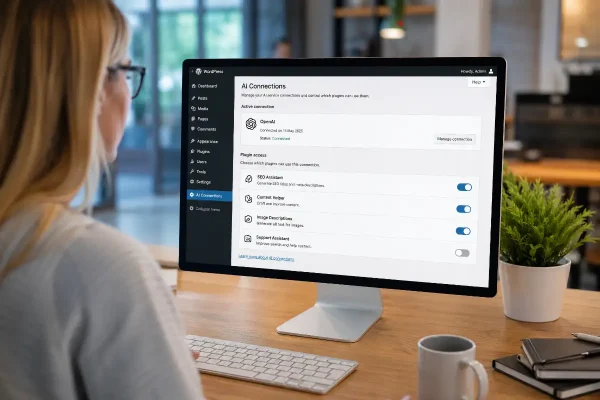
WordPress 7 AI connectors may help small businesses manage AI tools, content support, SEO and website controls more safely.

Imagine this. You are halfway through Christmas lunch when something slips. The site drops, an order looks stuck, or a post goes live before it is ready. If you act now, none of this needs to become a crisis. You can have a short plan, the right people, and a simple way to fix things while you are away.
Your holiday incident plan should cover three areas: technical recovery when the site goes down, customer service when an order or booking is at risk, and content fixes when a human error needs tidying up. These jobs might fall to one person or be shared across a small team. What matters is that everyone knows what they are responsible for and that they have tested their access before the break.

When your site goes down, name the person who carries technical responsibility. Give them authority to act without waiting for approval and make that clear before the holidays. Make sure they can reach everything needed to fix real problems — hosting, the domain registrar, WordPress admin, the backup service, and your content delivery network if you use one. Store logins in a password manager and share them securely, not by email. Test each login once. If two factor authentication is enabled, confirm that it works for this person. If it lives on someone else’s phone, add a backup method or recovery codes now and store them safely.
Backups must restore, not just exist. Ask your technical contact to perform a small test restore to a staging site or local copy. Files and database should both come back cleanly. Write down the steps and keep them with your access notes. If a restore fails or no one knows how to do it, fix that now while help is easy to reach.
You also need eyes on uptime. Set up a monitor that checks the site every few minutes and alerts a real person if it stays offline. Route alerts to the technical contact and add a second contact in case they are out of signal. Keep the settings practical. One short hiccup does not need an alert, but five minutes down does. Keep a light change freeze too. Publish content if you must, but avoid new plugins, theme changes or major configuration updates. If an urgent change is unavoidable, do it early in the day with your technical contact available.
The second part of your plan is customer service. Choose someone who can watch sales and messages while you are away. They need access to your store dashboard, payment gateway, order inbox, and any booking or ticketing tools you use. Share access through your password manager and test each login. If two factor authentication is required, add a method this person can use and keep recovery codes with the credentials.
Give this person the authority to fix small problems straight away. If a promotion code breaks the cart, they should be able to disable it. If a payment looks stuck, they should check the gateway and decide whether to capture or refund. If a booking slot is oversold, they can block it out and contact customers with a clear next step. Write down these powers so there is no hesitation when quick action is needed.
Prepare a short status message now for your website or social channel in case there is a visible issue. Write another short note you can send to customers about delays or refunds. Save both in shared notes so they are easy to use later. Also make sure your customer contact knows how to escalate. If the checkout fails or a payment issue repeats, they must know who to call. List the technical contact’s number and a backup. Include your payment provider’s support number for urgent cases.
The third part of your plan is content control. Human errors happen. A post goes live a day too soon, holiday hours are missing, or a price is wrong. Name a content contact with access to WordPress, your page builder, the menu editor, and your newsletter tool if needed. Again, share logins securely, confirm two factor, and test access once.
Give this person clear boundaries. They can correct typos, update hours, remove old banners, and unpublish a draft that slipped. They can swap a hero image if it ended up on the wrong page. They cannot change layouts, install plugins, or alter templates. The goal is a tidy, current site, not a redesign.
Ask the content contact to do a quick sweep before the break. Check the homepage, the key landing pages, your shop or booking pages, and the contact page. Remove outdated banners, add holiday hours where people expect to see them, and confirm that every call to action still makes sense. That five-minute sweep prevents most confusion and support requests.
All three roles depend on the same basics: access that works, two factor that is shared safely, a clear process written down, and a way to escalate when something is bigger than expected. Put all those details in one shared note. Include who is responsible for each part, how to reach them, where the logins are kept, how to restore a backup, how to post a status message, and which actions are allowed without approval. Keep it short and plain. Then test it once. Ask each person to log in, do a dry run of their first task, and confirm they can reach the next person in the chain.
If you prefer a trusted pair of hands, you can hand this cover to a team that does it every day of the year. A website care plan gives you monitoring, updates, a direct line when something breaks, and someone who can act without delay. If that is the right move for you, talk to Asporea Digital and set the handover before the break.
Before you log off, make sure you can reach your site if something goes wrong. A quick test now saves panic later.

WordPress 7 AI connectors may help small businesses manage AI tools, content support, SEO and website controls more safely.

Buying a domain is only step one. This plain English guide explains hosting, why builders like Wix can become limiting, and the smarter way to

Substack is easy to launch, but paid publishing needs strategy. Shape the content, offer and member journey before adding a paywall.
