

Blog

Why Author Websites Matter More Than Ever
Why authors need a website to build credibility, showcase books, grow readers and create a professional online presence.

WordPress 7 is expected to make AI features easier to manage from one place.
That does not mean your website will suddenly run itself. It does not mean AI should write every page, answer every customer question or change your website without review.
WordPress is expected to give websites a more controlled way to connect with AI services. Instead of several plugins each asking for separate AI settings, WordPress may allow those connections to be handled more centrally.
For a small business website, that matters because AI is already appearing inside common website tools. It appears in writing assistants, SEO plugins, product description tools, image tools, chat tools and website maintenance reports. The issue is whether you can see what is using AI, control it properly and avoid sending the wrong information to the wrong place.
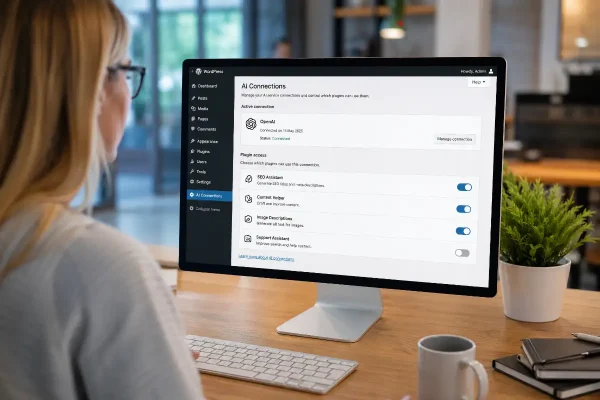
An AI connector is an authorised bridge between your WordPress website and an AI service.
Your website sits on one side. The AI service sits on the other. The connector is the approved connection that lets a plugin ask the AI service for help.
The connector is usually not the feature you use. It is what allows the feature to work.
For example, a plugin may help write a search description for a service page. Another plugin may suggest text that describes an image. Another may summarise a blog article. Those are the features you see. The connector is the bridge they use to reach the AI service.
Business owners do not need to become AI experts. The practical questions are simpler. Which connections are open? Which plugins are allowed to use them? What information is being sent?
At the moment, AI settings in WordPress are decentralised.
One plugin may ask for its own AI access details. Another plugin may ask for the same thing somewhere else. A third plugin may use a different provider altogether.
The result is a website that becomes harder to audit and explain.
A business owner may not know which plugin is using AI. An office manager may not know whether customer enquiry details are being sent to an external service. An agency may have to check several settings screens just to work out what is connected.
A centralised connection makes this easier to manage.
Instead of setting up AI access separately across several plugins, WordPress 7 is expected to make those connections easier to manage from one place. The exact details will depend on the final release and on which plugins you use, but the direction is clear: less duplication and better visibility.
The practical value is control. A business owner should be able to see what is connected, understand what it is doing and switch it off when it is not needed.
The most useful early AI features for small business websites are likely to be ordinary tasks that already take time. Drafting. Reviewing. Summarising. Describing. Reporting.
A writing plugin may help turn rough notes into a first draft for a blog post or service page. That can be useful when you know what you want to say but need help shaping it clearly.
An SEO plugin may suggest page titles and search descriptions. These are the short pieces of text that can appear in search results. They still need review, but AI can provide a workable starting point rather than leaving a blank field.
Image tools may suggest descriptions for images. These descriptions help people using screen readers and help search engines understand the page. Many small business websites have years of images with missing or poor descriptions. AI may help tidy that up, provided someone checks the result.
Blog tools may create short summaries from longer articles. That can help with excerpts, newsletters or social posts.
WooCommerce stores may use AI to draft product descriptions, short descriptions or product FAQs. This can save time where a store has many products, but the details must be checked carefully. Product size, colour, inclusions, delivery details and warranty wording cannot be guessed.
Service businesses may use AI to draft FAQ questions from a page. A plumber, accountant, consultant, electrician or clinic could use this to identify useful questions customers often ask. The answers should still come from the business.
Maintenance tools may use AI to turn technical website updates into plain-English summaries. Instead of seeing a list of plugin updates and security notices, you may receive a clearer explanation of what changed and whether anything needs attention.
Search and support tools may also become smarter. A customer may search for “Do you service Googong?” or “Can I change my booking?” and the website may do a better job of pointing them to the right page. This depends heavily on the plugin and how well your site content is organised.
Most business owners will not need to understand how the connection works. They will need to know which tools are using it, what information those tools can access and who is responsible for checking the output.
You may see a place in WordPress where AI connections are managed. You may connect an AI service once, then allow certain plugins to use it. You may also see more plugins offering AI-assisted features because the connection work becomes easier for plugin makers.
The visible features will still depend on your plugins.
A website with an SEO plugin may see AI support for titles and search descriptions. An online store may see help with product copy. A site with a support plugin may see smarter help content. A simple brochure website may not see much until specific plugins add useful features.
The better starting point is whether a specific AI feature saves time without increasing risk. For many small businesses, that will mean help with draft content, search descriptions, image descriptions, blog summaries and simple website reports.
For agencies, web consultants and internal marketing teams, centralised AI connections may make client sites easier to manage.
At the moment, AI settings can be hidden inside individual plugins. That makes documentation harder and handovers messier. It also makes it harder to explain to a client what is connected to their site.
A more centralised approach may allow agencies to document AI use more clearly. Which AI service is connected? Which plugins can use it? What is it being used for? Who pays for usage? Who reviews the output?
Clients get a clearer record of what has been enabled, what it is used for and who is responsible for reviewing the output.
Agencies also need to be clear with clients. If AI is being used to draft content, summarise reports or support customer search, the client should know. If customer data is not being sent to an AI service, that should also be documented.
Imagine a local accounting firm with a WordPress website.
The office manager updates staff profiles, publishes occasional tax articles and keeps the service pages current. The firm does not want AI giving financial advice. That would be risky and inappropriate.
AI still has a place in lower-risk tasks.
The office manager might use it to draft a short summary of a blog article, suggest a search description for a bookkeeping page, write descriptions for staff photos and prepare draft FAQ questions for review.
The accountant checks anything technical before it goes live. The AI helps with the first draft. It does not decide what the firm says to clients.
The AI supports the workflow. It does not replace professional judgement.
AI features need clear limits.
The first risk is plugin access. If several plugins can use one AI connection, you need to know which plugins have permission. A plugin used for image descriptions should not automatically mean another plugin can send customer enquiry details to an AI service.
The second risk is privacy. Some website information is harmless. A draft blog post about choosing a website designer is usually low risk. A customer enquiry, order note, medical form, legal matter or private business document is not.
If your website collects customer details, booking information, form submissions or WooCommerce orders, be careful. Do not assume AI tools are safe just because they are inside WordPress.
The third risk is cost. Some AI services charge based on how much they are used. A few short writing suggestions may cost very little. A tool that automatically scans hundreds of products, pages or customer messages may cost more than expected.
The fourth risk is poor-quality content. AI can write confidently and still be wrong. It can also produce bland content that sounds acceptable but says very little. That is a problem for service businesses, where trust often comes from specific details, local knowledge and clear promises.
The fifth risk is over-automation. Letting AI draft something for review is one thing. Letting it publish pages, answer customers or change important content without checking is another.
Human review should stay in the process.
Start with tasks where the risk is low and the output is easy to check.
Search descriptions are a good starting point. They are short, visible and simple to review.
Image descriptions are another good use, especially for older websites with lots of uploaded images.
Blog summaries can save time without affecting the main article.
Draft FAQ questions can help improve service pages, provided the business writes or checks the answers.
Maintenance summaries can help business owners understand what has happened on the website without reading technical reports.
For WooCommerce stores, product description support can be useful, but start with a small group of products. Check the output carefully before using it more broadly.
Do not use artificial-intelligence to publish legal, financial, medical or technical advice without expert review.
Do not let it answer customer questions about refunds, warranties, pricing, service inclusions or availability unless the answers are tightly controlled and based on approved content.
Do not send sensitive customer information into tools unless you have properly assessed privacy, consent and provider terms.
Do not let artificial-intelligence rewrite your entire website without a proper brief and review process. That often leads to generic copy and can remove details that customers actually need.
Do not switch on features just because a plugin promotes them.
A feature may work technically and still be unsuitable for the way your business operates.
Use this short checklist before enabling AI features on your WordPress site.
Which artificial-intelligence service will the website connect to?
Which plugins will be allowed to use it?
What information could those plugins send?
Could customer details, order notes or enquiry forms be included?
Who will review AI-written content before it is published?
Are there spending limits or billing alerts?
Is the feature solving a real problem?
If you cannot answer those questions, pause before enabling the feature.
WordPress 7 AI connectors are expected to make these features easier to connect, manage and control. For small business website owners, that is more useful than having AI scattered across plugin settings you may never check.
The best uses will be practical: content support, SEO assistance, accessibility improvements and clearer admin summaries. These are areas where AI can save time without taking over the business.
The main risks are just as practical: privacy, cost, plugin permissions and poor-quality automated content.
Start with low-risk tasks. Keep human review in place. Be clear about which plugins can use it and what information they can send.
AI can be useful on a WordPress website, but it should be used deliberately. Not everywhere. Not automatically. Not without review.

Why authors need a website to build credibility, showcase books, grow readers and create a professional online presence.

Stop getting silence after you hit send. Use an AI Assisted Automated Response that reflects the enquiry and buys time properly.

Help January customers choose with confidence by aligning your products with what they want at the start of a new year.
