

Blog

Send Social Traffic to the Offer Page
Stop wasting social traffic. Send people to the offer page that explains, answers questions and helps them decide.

Domain management is the active, ongoing process of registering, renewing, configuring, and securing a domain name to maintain a reliable online presence. It covers far more than buying a web address and walking away. Core tasks include DNS record configuration, WHOIS contact maintenance, domain locks, and regular health monitoring. For any business owner, understanding domain management is the difference between a website that works every day and one that quietly fails at the worst possible moment.
Domain management is best understood as a continuous suite of protective actions, not a one-time technical setup. Domain registration and DNS are distinct but interdependent functions. Registration gives you ownership of the name. DNS tells the internet where to send visitors who type that name into a browser. Both require active attention.
Think of your domain as a business address. Registration is like signing the lease. DNS configuration is like putting up the signage and directing foot traffic to the right door. If either breaks down, customers cannot find you.

The standard industry term for this discipline is domain name administration, and it encompasses every decision you make about how your domain is set up, secured, and maintained over time.
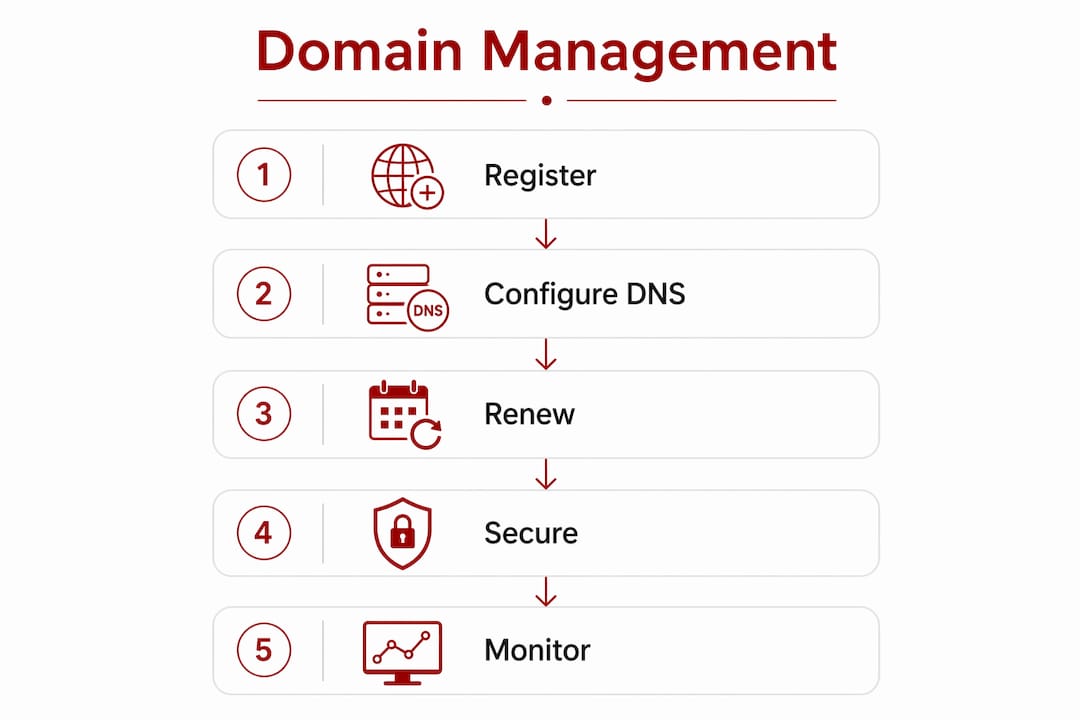
Effective domain management covers these essential tasks:
Pro Tip: Set a calendar reminder every six months to log into your registrar, confirm your contact details are current, and verify your auto-renewal is still active. This single habit prevents the majority of domain-related crises.
Initial setup typically takes 30–60 minutes and involves verifying ownership, pointing DNS records to your website and email provider, and confirming renewal settings. The ongoing work is lighter but just as consequential.
A neglected domain creates real business risk. Expired or misconfigured domains can cause complete business downtime, cutting off both your website and your email in a single event. For a service business, losing email access for even a few hours means missed enquiries and damaged trust.
The risks extend beyond simple expiry. Here are the four most damaging consequences of poor domain management:
“Domain management is not ‘set and forget.’ Continuous small actions and dashboard monitoring build a stable digital presence.” Registrar dashboards function as security command centres, not just billing portals.
Monitoring tools like MxToolBox and Site24x7 detect DNS propagation issues and blacklist status quickly, giving you a chance to act before customers notice a problem. Waiting until something breaks is not a strategy.
The gap between businesses that handle domain management well and those that do not usually comes down to a few consistent habits rather than technical sophistication.
Your registrar and your DNS host are not always the same provider. Authoritative DNS zones act as the internet’s address book, routing users to the correct services under your domain. You can register a domain with one provider and host its DNS records with another. That flexibility is useful, but it requires careful coordination.
A managed DNS zone through a unified control panel reduces the risk of misconfiguration. Keeping your domain registration and DNS hosting with the same provider simplifies this further, particularly for small businesses without a dedicated IT person.
For businesses connecting their domain to services like Microsoft 365, DNS record updates and ownership verification are required at the registrar level. The Domain Connect protocol can simplify this process for supported providers.
| Approach | Best suited to | Key benefit |
|---|---|---|
| Single registrar with built-in DNS | Sole traders and small businesses | Simplicity and fewer moving parts |
| Separate registrar and DNS host | Growing businesses with specific needs | Greater control over DNS performance |
| Centralised dashboard management | Businesses managing multiple domains | Reduced configuration drift and easier audits |
| Infrastructure as Code tools | Larger organisations with technical teams | Consistent, version-controlled DNS changes |
Infrastructure as Code tools are becoming standard practice for larger businesses that need to centralise domain and DNS management across many assets. For most small businesses in Canberra, a single reputable registrar with a clear dashboard and auto-renewal is the right starting point.
Pro Tip: Schedule a full domain audit once a year. Check every DNS record, confirm your SSL certificate is current, verify your registrar contact details, and review who has access to your registrar account. Thirty minutes once a year prevents significant problems.
Securing the email account linked to your registrar contact is one of the most overlooked security steps. Attackers who control that inbox can reset your registrar password and transfer your domain without ever touching your website.
Most domain problems are preventable. They tend to follow the same patterns, and recognising them early makes recovery far easier.
Recovery from a domain-related incident follows a clear sequence. First, regain access to your registrar account using backup codes or identity verification. Second, confirm your domain is still registered to you and the transfer lock is active. Third, audit every DNS record for unauthorised changes. Fourth, update all account credentials and enable two-factor authentication before doing anything else. The domain hosting security guide from Asporeadigital covers this recovery process in detail for small business owners.
One pattern worth noting: business owners often assume domain management is complete once their site goes live. Continuous updates to WHOIS contacts and registrar security settings are required long after launch. The site being live is the beginning of domain management, not the end of it.
For a broader view of how domain scams target small business owners, the Asporeadigital resource on domain scam awareness is worth reading before you receive your next renewal notice.
Effective domain management requires consistent, routine attention across registration, DNS configuration, security settings, and contact details to keep a business online and protected.
| Point | Details |
|---|---|
| Domain management is ongoing | Treat it as continuous maintenance, not a one-time setup task. |
| DNS and registration are separate | Keep nameservers correctly pointed to avoid silent outages. |
| Security settings prevent hijacking | Enable transfer locks and two-factor authentication on your registrar account. |
| Contact details must stay current | Outdated WHOIS information causes missed renewal notices and domain loss. |
| Regular audits catch problems early | A yearly review of DNS records, SSL certificates, and account access prevents most incidents. |

Managing a domain well is one part of keeping a business website reliable and credible. The other part is having a website that is built, hosted, and maintained with the same level of care. Asporeadigital works with small businesses across Canberra and the Capital Territory to provide exactly that. From website support and maintenance through to secure hosting and WordPress development, the team handles the technical side so you can focus on running your business. If your current website or domain setup feels uncertain, a conversation with Asporeadigital is a practical next step. Fixed pricing, local knowledge, and direct support from a team that understands what Canberra businesses actually need.
Domain management is the ongoing process of registering, renewing, configuring, and securing a domain name. It includes DNS setup, contact maintenance, and security measures to keep a website and email running without interruption.
A full review once a year covers DNS records, SSL certificates, registrar contact details, and account security. Auto-renewal should be confirmed at the same time to prevent accidental expiry.
A registrar is where you register and renew your domain name. A DNS host manages the records that route traffic to your website and email. They can be the same provider or different ones, but both require correct configuration.
An expired domain takes your website and email offline immediately. If not renewed within the grace period, the domain becomes available for anyone to register, including competitors or bad actors who may demand payment to return it.
Enable a transfer lock on your registrar account, activate two-factor authentication, and secure the email address linked to your registrar contact. These three steps block the most common methods attackers use to take control of a domain.

Stop wasting social traffic. Send people to the offer page that explains, answers questions and helps them decide.

Startup advice from other startups can sound useful, but experience is what helps shape a clearer, stronger business early.

Stop getting silence after you hit send. Use an AI Assisted Automated Response that reflects the enquiry and buys time properly.
