

Blog

9 Signs You’re Ready to Build a Membership Site
9 signs you’re ready to build a membership site and turn your content into a structured, income generating online business.

Unfortunately, most website owners only look at Google when things aren’t going well.
It typically starts with a search of your business name, and then perhaps what you sell.
When the search results return. Some people see their site but it looks wrong. The title is vague. The link looks messy.
The description underneath reads like random scraps. Even if your website itself is decent, the preview in search is often the reason someone clicks on your site, or someone else’s.
Is this what you find?
The good news is that Google is not out to get you. The purpose of this article is to show you the parts of your posts that really count.
By knowing how to preparing your posts, you can dramatically improve how your site appears in Google search results.
Each post or page should have one focusing keyphrase.
This is a term that you want search to learn about your business. It should be a phrase a real customer might type when they’re looking for exactly what that page offers.
Google will try to match the most relevant search to the term typed in, so your pages and posts can’t be ‘one size fits all’, because the search result will get very watery and general. If Google isn’t confident about your page, it will rank you lower.
This is why intent matters.
When a post has one clear focusing phrase, everything becomes easier to write and easier to structure, because you know what you’re trying to be the obvious answer for.
Here’s what that looks like:
Focus phrase: WordPress Maintenance
Page that should match it: your WordPress maintenance service page
Or:
Focus phrase: Wedding photographer Brisbane
Page that should match it: your wedding photography page
Or:
Focus phrase: Dog grooming Kingston
Page that should match it: your dog grooming page
This doesn’t need to be perfect, it just needs to be something that searchers might likely to type into Google. I like to say, “If you can say it out loud without cringing, you’re on the right track!”
Now you’ve got the focus phrase, you can shape the four WordPress bits that influence what Google shows.
Before we start on this journey, I want you to check your Permalink settings. Permalinks are the way that WordPress creates hyperlinks to your pages and posts. This matters because it’s a foundation setting.
If your site is still using the default WordPress link style, your URLs can look like this:
yourdomain.com/?p=234
A link like this doesn’t give Google any useful information.
To be useful to Google, you want your links to be something readable, like:
yourdomain.com/services/wordpress-help/
The links both end up on the same page, but from a very different looking link.
Making this change is easy, but you need to do it carefully. Changing your permalinks will break the listings that Google currently has. If Google is not optimised, this probably doesn’t matter, but if your site has been operating for a while, you may want a redirect plugin, I’ll explain this a little later.
Now, to change your Permalinks structure.
From your WordPress dashboard, go to Settings → Permalinks and select Post name.
Update your permalink structure from the default.
Once that’s saved, your URLs become readable, and your slugs become meaningful, like:
yourdomain.com/services/wordpress-help/
If your site has been live for a while, do this carefully and test old links afterwards. I’ll explain redirects properly in a moment.
Your page title often becomes the clickable line in Google results. It’s also the name of the page in your dashboard.
This is where your focus phrase earns its keep.
If your focus phrase is WordPress Maintenance Canberra, your title should make that obvious.
A title that aligns looks like:
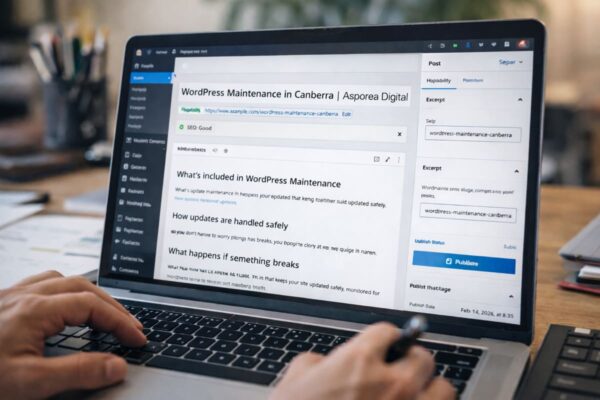
WordPress Maintenance in Canberra | Asporea Digital
In WordPress, this is the big field at the top of the editor. Change it and click Update.
A slug is the last part of the URL. It should be short, readable, and aligned to the focus phrase.
If your focusing keyphrase is: WordPress Maintenance Canberra
A messy slug might look like: /services/website-support/
It’s messy because it’s broad and vague. It doesn’t match what people search.
A better slug looks like: /wordpress-maintenance-canberra/
You can change what is in your slug, on each post and page when you are in Edit mode.
In the editor, right sidebar, Permalink. Edit the slug, then Update.
That’s slug optimisation. It reassures the human clicking, and it matches the language you want Google to associate with that page.
Change slugs sparingly. If you start with the right slug then you don’t need to change it. If you keep changing them, you keep creating old links that may need redirects.
Once the title and slug are clear, headings within your post or page, help keep the story consistent.
Your focus phrase shouldn’t be jammed into every heading like a bad radio ad, but the headings should clearly support the same topic.
For that same page, headings might naturally read like:
What’s included in WordPress Maintenance
How updates are handled safely
What happens if something breaks
WordPress Maintenance Pricing
How to get started
Notice what’s happening. The page is clearly about maintenance, not “services”, not “support”, not “digital solutions”. It’s staying on one track.
In WordPress, headings are just Heading blocks – or applying a style in the classic editor. Use your headings to break up the page into logical sections.
Excerpts are often hidden, so plenty of people never use them.
They’re a little piece of hidden magic. When you do use excerpts, you’re feeding WordPress a clean one paragraph summary of the page.
This works in two ways – firstly it influences how your post appears on your site. Have you ever seen how a post sometimes has a description that’s cut-off mid sentence with … or […]?
This fixes that.
The other way it helps is it gives Google a better chance of pulling a sensible description when it scans your site.
If you can’t see the Excerpt field when you are editing your posts, you may need to turn it on. Click the three dots top right in the editor, go to Preferences, and enable Excerpt in Panels.
A good excerpt for our maintenance page might be:
“WordPress maintenance in Canberra that keeps your site updated safely, monitored for issues, and supported when something breaks, so you don’t have to worry about plugins or updates.”
Neat, specific and human.
Put really simply, a redirect is a forwarding address. It prevents a changed link becoming a deadlink after you edit it. Instead of going nowhere, a visit to the old link ends up at the new link. It’s just like mail redirection when you move house.
Someone sends a letter to the old address, and it’s forwarded to the new one.
So if your old URL was:
yourdomain.com/?p=234
and after permalinks and slug changes it becomes:
yourdomain.com/wordpress-maintenance-canberra/
A redirect is what forwards anyone who visits the old link to the new one.
How to check if you need one is beautifully untechnical:
Before you change a URL, copy the old link.
After you change it, paste the old link into your browser.
If it lands on the right page, you’re fine. If it shows “page not found”, you need a redirect.
Redirects can be managed with a plugin. The method isn’t the point. The point is not breaking the path for humans and Google from your old link to where your content is now.
If you want to do this without creating a mess, here’s the order:
1. Set Permalinks first (once).
2. For each important page, choose a focus phrase.
3. Align the Title, Slug, Headings, and Excerpt to that one phrase.
4. Finally, test the old URL if you changed anything, and add a redirect if needed.
That’s the whole game. You’re not gaming Google. You’re helping your website describe itself clearly, the way a customer would.

9 signs you’re ready to build a membership site and turn your content into a structured, income generating online business.
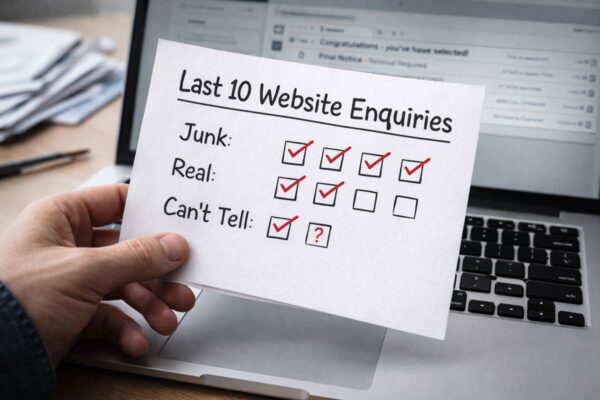
Count your last 10 enquiries. Spot where spam is leaking in, and see if real customers are getting buried.

A simple year-end reflection helps you shape clear, confident business goals for 2026. Start with three questions.
